14-Alexandrite
October 24, 2025
Solved

subtracting two different matrix dimensions

  • October 24, 2025
  • 2 replies
  • 1030 views

Hi 

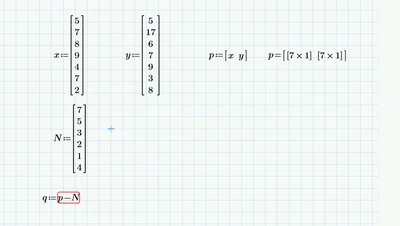
I need to subtract two different matrix . one has ( 7 rows, 2 column)  and the other has (5 rows , 1 column) 

I know the other own is shorter so the result should be the same number in the bigger matrix. like it treat the missing numbers as zeros 

Is that possible ? 

YA_10963798_0-1761304926432.png

Thank you 

The sheet is attached 

Best answer by Werner_E

So q is not a 1x2 matrix of vectors as in your example but rather a 2 x 1 matrix (or at the end an n x 1 matrix.

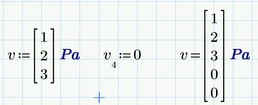
Adding units fortunately doesn't do any harm as Prime in this case seems to apply the correct unit even if we just add a dimensionless zero:
Werner_E_0-1761489485402.png


I further assume that, while q is a nested n x 1 vector holding column vectors the N always is just a simple column  vector. That means that none of the involved matrices will ever consist of more than 1 column. Is this correct?

Additionally I assume that you wan the result being of the same structure as Q (nested vector of vectors), right?

It's always best to be clear about what the task is and what you want the result to be, so there's no room for misunderstandings.

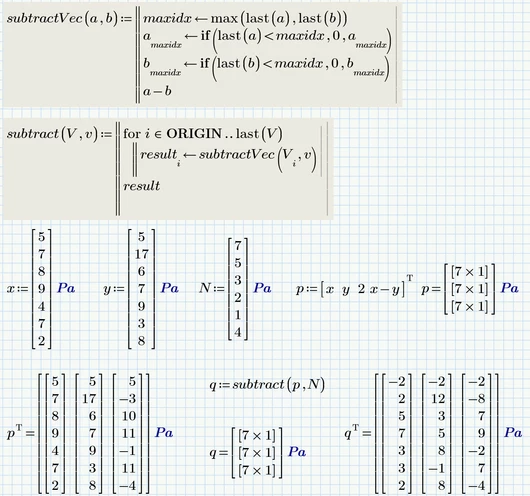
If my assumptions are correct, the following could be a sensible solution to your problem: 
Werner_E_1-1761491839724.png


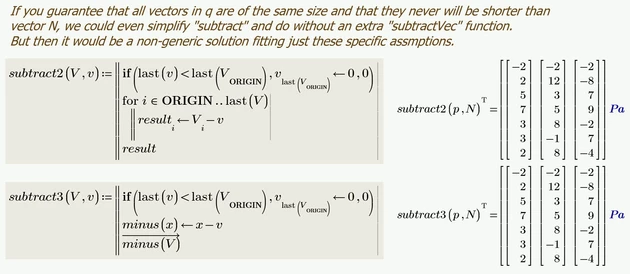
I also added shorter variants which seem to fit just your special situation
Werner_E_0-1761493966726.png


Prime 11 sheet attached


2 replies

19-Tanzanite
October 24, 2025

Like this?

subtracting.png


Prime 11 file attached.

14-Alexandrite
October 24, 2025

Hello , 

Thank you for you reply. The thing is I need to write that as a program ( so it calculate itself without the need to change it manually )  , because in my original sheet ( p values ) can exceed 100 values and also for N 

I can't manual add zeros to N every single time I use this calculation. 


I appreciate your reply , though 

Yusra 

19-Tanzanite
October 24, 2025

Simply change my subscript 6 for length(x)-1


subtracting.png


25-Diamond I
October 24, 2025

@YA_10963798 wrote:

Hi 

I need to subtract two different matrix . one has ( 7 rows, 2 column)  and the other has (5 rows , 1 column) 


No! the second in your sheet has 6 rows, not 5.

And the first is not a 7x2 matrix but rather a nested 1x2 matrix whose elements are both 7x1 matrices. Guess you should have used "augment" as shown by Alan.

One way to deal with your problem is to use a function which adds the necessary zero elements if necessary. If the matrix provided as argument is larger than demanded its returned unchanged:

Werner_E_0-1761313374748.png

This function now can be used in a "subtract" function. I placed "blowUp" into "subtract" as local function so "subtract" would be self-contained.

Werner_E_7-1761314205931.png


Another way could be to use nested for loops to do the job:

Werner_E_3-1761313923609.png

Prime 11 sheet attached


25-Diamond I
October 24, 2025

Or could it be that you intend to subtract the column vector N from EACH column in matrix p???

So which of the two results below did you expect?

Werner_E_0-1761341144675.png


Or maybe it wasn't an accident that you defined p as a nested vector?? After all you didn't comment on Alan's modification (augment).

Maybe you had something like this in mind??

Werner_E_1-1761341235815.png


21-Topaz II
October 25, 2025

Hi,

An expansion of Alan's solution that works without manual input based on size of p.

Capture.JPG