7-Bedrock
October 24, 2022
Solved

Summation

  • October 24, 2022
  • 2 replies
  • 1392 views

Hello Experts,


When I am trying to use summation instead of giving one single value it is giving me table as output can someone please help 

Best answer by Werner_E

Attached is a file with the suggestions of Luc implemented

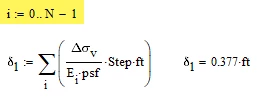
You can use your way but because you are using the default value 0 for ORIGIN, vector indices start with 0 and so you have to accommodate for that when you define you range.

Werner_E_0-1666647340705.png

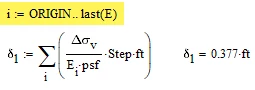
But you are on the save side if you define the range as was suggested by Luc. And its important that you you the vector/matrix index on E and not a literal one!

Werner_E_1-1666647431486.png


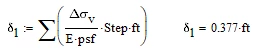
To calculate the sum you may also use the vector sum from the matrix toolbar (her you don't need any index on E)

Werner_E_2-1666647523689.png


2 replies

23-Emerald IV
October 24, 2022

You probably want to set

i:= ORIGIN...last(E)

to have it index all elements of the vector E.

Then in the summation you have i at the bottom of the Sigma, but you should also use it in the argument to Sigma.

instead of just

E

use

E[i


Success!
Luc

23-Emerald I
October 25, 2022

There us a shortcut:

Fred_Kohlhepp_0-1666712367302.png


Werner_E25-Diamond IAnswer
25-Diamond I
October 24, 2022

Attached is a file with the suggestions of Luc implemented

You can use your way but because you are using the default value 0 for ORIGIN, vector indices start with 0 and so you have to accommodate for that when you define you range.

Werner_E_0-1666647340705.png

But you are on the save side if you define the range as was suggested by Luc. And its important that you you the vector/matrix index on E and not a literal one!

Werner_E_1-1666647431486.png


To calculate the sum you may also use the vector sum from the matrix toolbar (her you don't need any index on E)

Werner_E_2-1666647523689.png