Summation Operation with Table inputs
Hi,
I'm trying to convert some excel sheets into mathcad,
this particular one uses the summation function for variables features to be included,
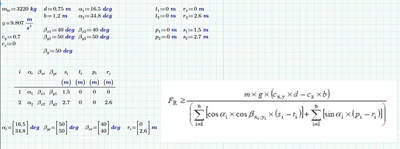
I've set up a table list to define the variables, these are calculated earlier in the document so I didn't want to simply input the values as they could change.
I'm having trouble with a fewof things
1. if i include beta.yi in the equation it displays the result as a matrix rather than a single answer
a. I've managed to crowbar this to work with beta.y which as it is the same for both values (50 deg) to get a result but i'm aware that this isnt the correct final solution
2. the summation results are double what i am expecting, by tweaking the "n" value from 2 to 1 the results match but don't match what i understood how the function should work as
a. i=1 the starting value of the summation
b n (n=2) the ending value of the summation where n>i
3. as i haven't defined any further values in the table i would expect that if n was set to 3 or above there would be no change to the values (as there is a multiplication by zero within those numbers) however im finding that as n increases the results do continue to change.
ive attached a copy of the worksheets
- in green the manual approach which shows the results im trying to achieve
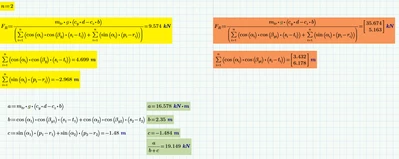
- in yellow is the section where ive set beta to beta.y (non matrix) which shows the final results double what im expecting
- in orange where beta uses beta.yi from the table which returns the matrix reults
n.b, the original equation ive pasted into the sheet uses beta xi,yi these are to evaluate different cases (so arent used at the same time)
Any help / advice would be great thanks (i'm probably not using the correct syntax)
but its not clear from the help files how to fix,
Richard,
(struggling to upload the file but please see below for screenshots)