
23-Emerald V
November 2, 2016
Question

Suppress Symbolic Solution in M15

  • November 2, 2016
  • 37 replies
  • 16025 views

I don't know if this has been noted before, but I managed (by accident) to suppress the display of a symbolic solve in M15 [Mathcad 15.0 (M030 [MC15_M030_20131216])]
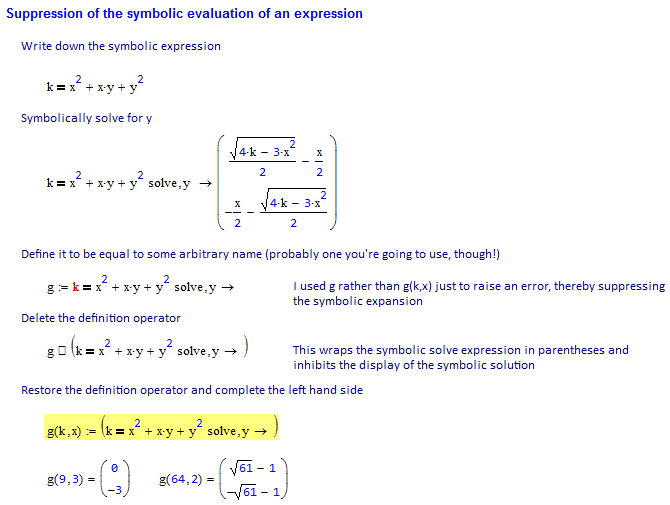
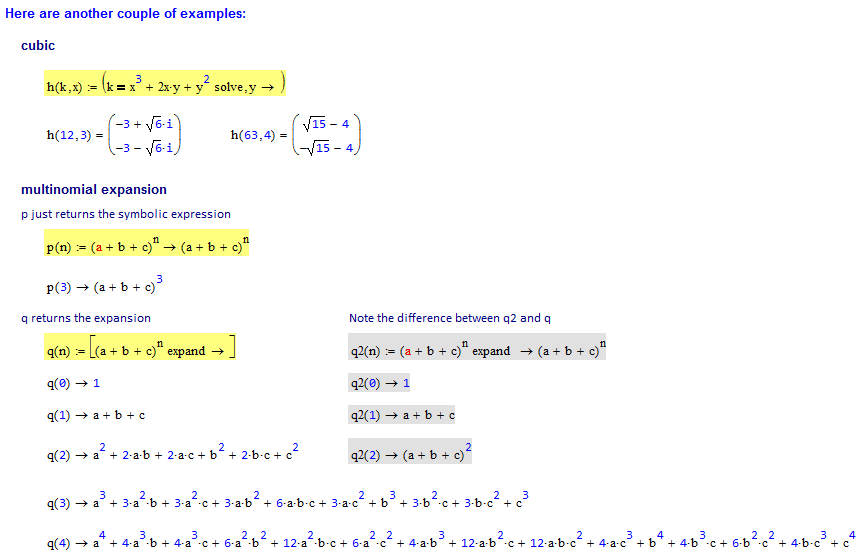
Does this work in other versions of Mathcad?

Stuart

37 replies

1-Visitor
November 2, 2016

Interesting find.  It works for me in MC15_M010_20110622.

23-Emerald IV
November 2, 2016

Hi Stuart,

Here is Mathcad 11:

All reds are "This variable is not defined above".

Luc

23-Emerald V
November 2, 2016

LucMeekes wrote:

Hi Stuart,

Here is Mathcad 11:

All reds are "This variable is not defined above".

Hmm, interesting, Luc.  So, the symbolic evaluation of q works, but the definitions don't carry over into the numerical world.

Stuart

23-Emerald IV
November 2, 2016

Yep, that's what it is.

So its partly helpful in Mathcad 11.

25-Diamond I
November 2, 2016

Wasn't aware of this. its nice and useful!

It also works if you type the symbolic expression anywhere on the sheet, cut it out via Ctrl-X (including the RHS) and then type yor function name like q(a,b,c):= make a pair of parantheses and copy in the placeholder you just created.

I like it!

23-Emerald V
November 2, 2016

Werner Exinger wrote:

Wasn't aware of this. its nice and useful!

It also works if you type the symbolic expression anywhere on the sheet, cut it out via Ctrl-X (including the RHS) and then type yor function name like q(a,b,c):= make a pair of parantheses and copy in the placeholder you just created.

I like it!

Yes, I forgot to add that bit.  Here's another interesting little morsel - try typing f(n)= after creating such a definition!

Stuart

24-Ruby IV
November 3, 2016

All the same here in MC15 M045.

23-Emerald IV
November 2, 2016

It doesn't need to be so complicated, in Mathcad 11 I can:

The result is the same.

Luc

23-Emerald IV
November 2, 2016

That is, by the way, the same method I use to plug symbolic expressions into programs.

19-Tanzanite
November 2, 2016

Interesting find! I see two problems though:

1) Next time I will need this I will have forgotten how to do it.

2) It's a useful, but undocumented, feature, so at some point it will be taken away from us

23-Emerald V
November 3, 2016

Richard Jackson wrote:

Interesting find! I see two problems though:

1) Next time I will need this I will have forgotten how to do it.

2) It's a useful, but undocumented, feature, so at some point it will be taken away from us

1).  Of course.  Goes without saying. 

2).  I'm tempted to mark your answer correct ...

Stuart

24-Ruby IV
November 3, 2016

Stuart,

In the Mathcad 15 M045 service release I have only no symbolical answer for "p(n)", for the rest all too most, as at you (please see PDF attached).

Pic_1.png

23-Emerald V
November 3, 2016

Спасибо, Владимир.


What does Prime do?  If it can't be directly implemented, does it still work in an imported (M15) worksheet?

Richard Jackson wrote:

Interesting find! I see two problems though:

1) ...

2) It's a useful, but undocumented, feature, so at some point it will be taken away from us

Please let "The System" keep our toys in later versions ....

Stuart

19-Tanzanite
November 3, 2016
What does Prime do?  If it can't be directly implemented, does it still work in an imported (M15) worksheet?

What a surprise:

21-Topaz II
February 27, 2020

Hi

With a little trick you avoid having the constants and variables  painted in red. 

SBanswer.jpg

1-Visitor
February 27, 2020

I hope I understand your trick but it doesn`t work in my case and I don`t understand why.

File is attached

Symb suppress-1.png

21-Topaz II
February 27, 2020

Hi, 

I think that, in addition to the round brackets, the symbolic equal is not really needed.

Ifomenko answer.jpg