

Solved
Supress units in equation
Hello guys,
I am new to Mathcad, learning and calculating my masters thesis and recently came to a problem.
There are some formulas in my work (timber structural engineering), which were evaluated by an experiment and units in formula - result are not the same.
My question is, if I can supress Mathcad base unit system and force to calculate just with numbers as on calculator?
Here is a screenshot with my problem, I understand the program does not know what to do with the exponent of "d", just would like to know, if there is a way to go around this.
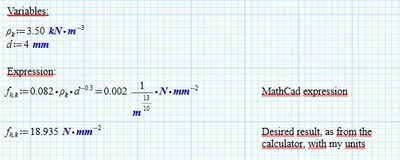
I tried to add constants to the formula to make the wierd 1/m^(13/10) disappear, but with no result.
Could someone give me a hint?
Thank you for help
Best regards
Stepan Mudrak
