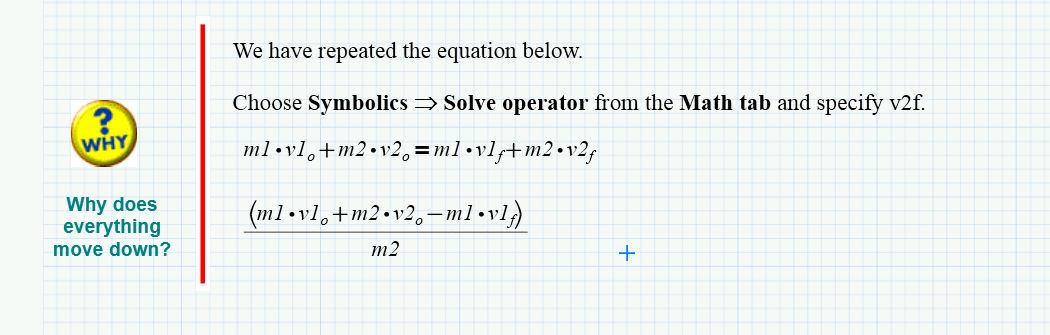
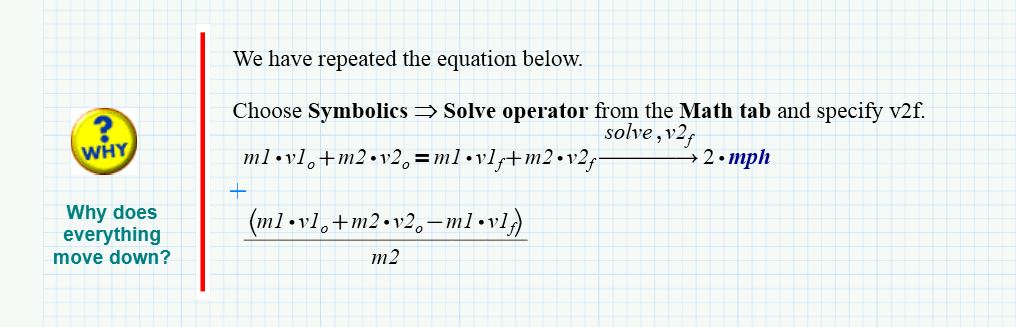
The reason for your problem is, that the tutorial you are working through is a very old one written for older (and better) versions of Mathcad. In those versions we had a feature called static symbolics and this would not consider any values assigned to the variables in play and returns a result in a separate region as indiceated in the sheet.
Prime is a mediocre version, slow, uncomfortable and missing a lot of features. Static symbolics is not available in Prime anymore and while I continue using Mathcad 15 to be honest, I won't miss static symbolics.
PTC tries to offer material for Prime to push it but they don't have much material for that version as most longterm users would rather stick to Mathcad 15. So they took those very old tutorials and converted them to Prime format without much thinking and editing - obviously a low budget production. The really did a poor job (as they also did in creating Prime) and you will find a lot of that kind of errors and inconsistencies when you work through those sheets. But if you know about the problem you may benefit from dealing with those files anyway. You may have noticed that throughout the sheet you are told to type v2.f which is wrong. The period is the way to create a literal subscript in Mathcad 15 and below. in Prime it is v2ctrl+-f
Prime only offers dynamic symbolics and this will consider values assigned to variables - thats the reason you get the numeric solution.
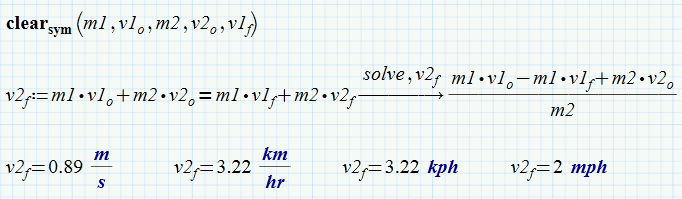
If you need a symbolic one, you may hide the values from the symbolics. You do this using the clear.sym statement. You also don't need to copy an expression to assign v2.f a value as written in the sheet but can do it in one step and later display v2.f in any unit you like.