Best answer by Werner_E

You like complicated and confusing names in your sheet, don't you? But in stripped down sheets for this forum to show a specific problem, simple names would be preferable.


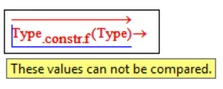
When you evaluate an expression symbolically, the symbolic traces back the sheet as far as it can. The reason for you sheet failing is because the symbolic is not able to evaluate "Type.const.f(Type)" . I am not sure why but it says that you can't compare variable Type with a string.
Werner_E_0-1584784635266.png

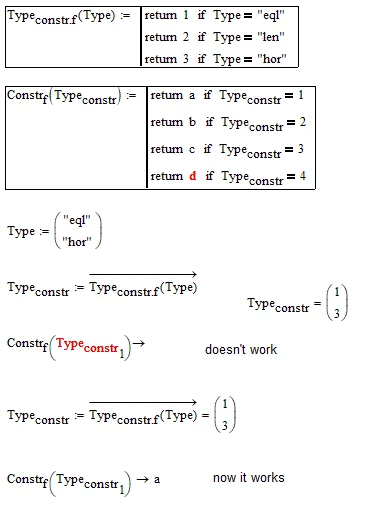
Your second approach works OK because you evaluate "Type.const.f(Type)" only numerically.


1 reply

Werner_E25-Diamond IAnswer
25-Diamond I
March 21, 2020

You like complicated and confusing names in your sheet, don't you? But in stripped down sheets for this forum to show a specific problem, simple names would be preferable.


When you evaluate an expression symbolically, the symbolic traces back the sheet as far as it can. The reason for you sheet failing is because the symbolic is not able to evaluate "Type.const.f(Type)" . I am not sure why but it says that you can't compare variable Type with a string.

Werner_E_0-1584784635266.png

Your second approach works OK because you evaluate "Type.const.f(Type)" only numerically.
 

ifomenko1-VisitorAuthor
1-Visitor
March 21, 2020

Thanks, my dear Werner_E, I should have guessed myself and I`m sorry for complicated names.

25-Diamond I
March 21, 2020

As written here

https://community.ptc.com/t5/PTC-Mathcad/Pattern-match-exception-problem/m-p/655701/highlight/true#M189224

a moment ago, the problem is the comparison of a variable with a string. Mathcads symbolic muPAD is not able to do that. You may call it a bug or just an inability, a missing feature. The new symboli FriCAS in Prime 6 dos not have this restriction.

