1-Visitor
November 11, 2018
Solved

Symbolic result too large to display for a system of equation

  • November 11, 2018
  • 2 replies
  • 7193 views

Hello,

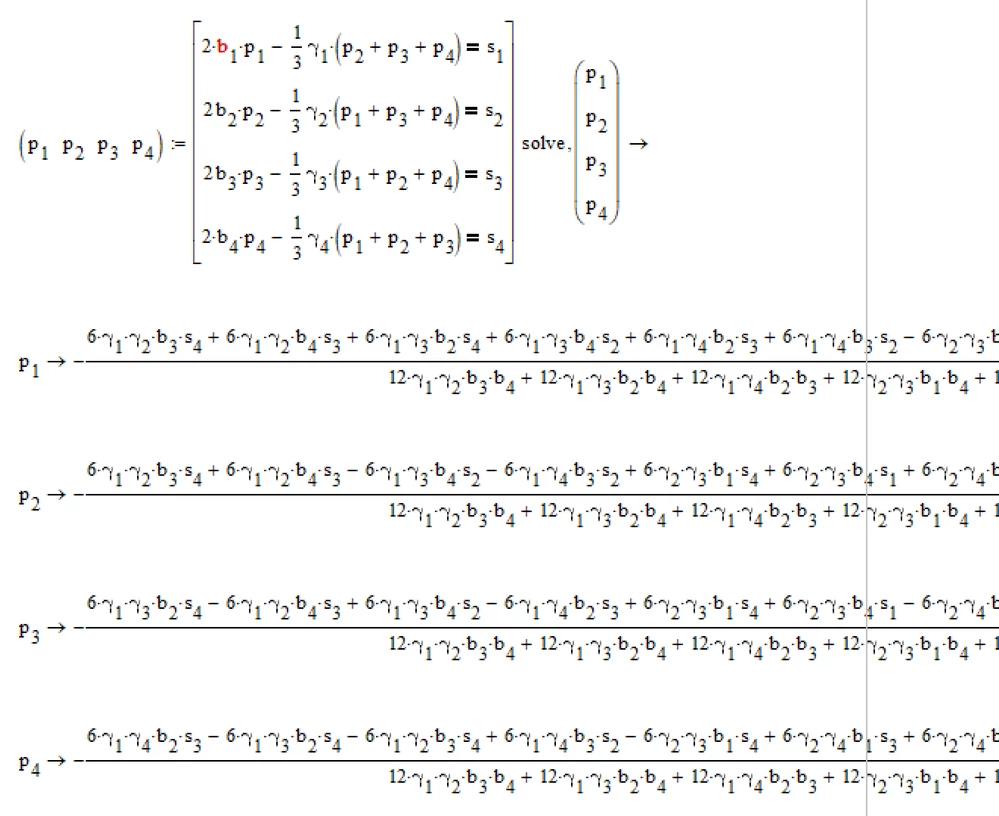
I am new to MathCad (version 15.0). I found similar issue in other posts but I was not able to implement it. I want to solve a system of equation for 4 equations and 4 variables. I receive the error "The symbolic result is too large to display". I need the symbolic result, because I am trying to find a general formula for any number of equations and variables for a specific problem .I'd appreciate it if you could help me with this issue.


I have attached the relevant file.


Thanks.

Abed.

Best answer by Werner_E

Symbolics can be quite beasty in Mathcad and usually there is not much you can do against that "result is to large ..." message.

But sometimes it helps to do what Mathcad suggests - assigning the expression to a variable.

In your case the result should be a 1 x 4 matrix and we could try to show each value separately - maybe a single value is not too large to display.

But in your case this fails. Digging further shows that the result is not a 1 x 4 matrix. Possibly Mathcads symbolics would show some if statements.

Fortunately the reason for this behaviour can be found. You had typed "2." instead of just "2" two times (2nd and third equation). Deleting the decimal points (which forces the symbolics into float mode) makes the whole thing work (don't ask me why 😉

Not sure if you will be really happy with the three page wide expressions you see, but here you are.

BTW, you used vector indices - guess it would be better to use literal indices (p.2 instead of p[2).

B.png

2 replies

Werner_E25-Diamond IAnswer
25-Diamond I
November 11, 2018

Symbolics can be quite beasty in Mathcad and usually there is not much you can do against that "result is to large ..." message.

But sometimes it helps to do what Mathcad suggests - assigning the expression to a variable.

In your case the result should be a 1 x 4 matrix and we could try to show each value separately - maybe a single value is not too large to display.

But in your case this fails. Digging further shows that the result is not a 1 x 4 matrix. Possibly Mathcads symbolics would show some if statements.

Fortunately the reason for this behaviour can be found. You had typed "2." instead of just "2" two times (2nd and third equation). Deleting the decimal points (which forces the symbolics into float mode) makes the whole thing work (don't ask me why 😉

Not sure if you will be really happy with the three page wide expressions you see, but here you are.

BTW, you used vector indices - guess it would be better to use literal indices (p.2 instead of p[2).

B.png

1-Visitor
November 12, 2018

Thank you so much. I didn't expect such fast response! I couldn't do it without your help.

23-Emerald IV
November 11, 2018

And the solution to the general case is here:

4eq4unk.png

Success!
Luc

1-Visitor
November 14, 2018

Thank you for your reply. By general case I mean n equation and n variable with similar shape in a compact form. e.g. for 5 equation and 5 variable it looks like this:

Capture.JPG

Which again I can not get the value for each p due to large size of the equation.

23-Emerald IV
November 14, 2018