1-Visitor
August 12, 2014
Solved

Table of results

  • August 12, 2014
  • 3 replies
  • 7837 views

I have a fairly complex formula for I(q,x) and I want to tabulate the results with q values (1 - 5) as the columns and x values (1 to 5) as the rows. I've no doubt it's very easy, but I can't see how to do it.

I apologize if I've posted this question to the wrong forum.

Best answer by Werner_E

JOHN WOODGATE wrote:

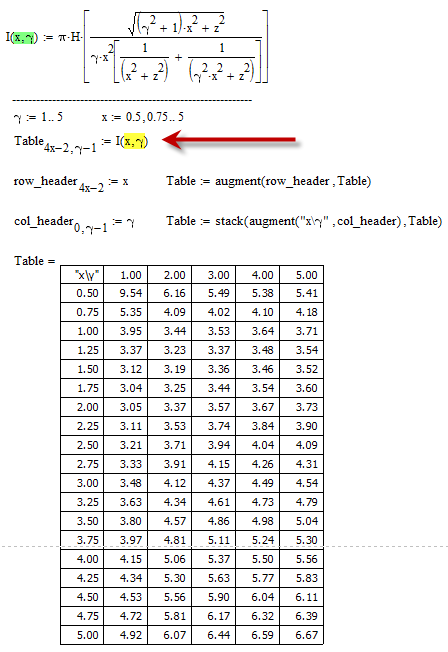
Well. I copied your script into mine, with strange results. The graphs are correct, I belive (I can check with the inverted equation, which should always give H = 0.4). But the tabled values are mostly not correct, and those that are, may be coincidence. Anyway, I've attached my worksheet for your appraisal.

The reason is that you have to switch the arguments of I(), either when you define I() or when you call it.

In your very first post you said you had a function I(q,x) and want a table with x (which is the second argument of the function) as rows. So my solutions took this for granted.

In your sheet you have defined I(x,gamma) and obviously you want a table with x (which is now the first argument of the function) as rows. So of course you have to switch the order of the arguments to get it right.

If you would use my last approach, you wouldn't need the auxiliary function for the very same reason either.

1.png

3 replies

1-Visitor
August 12, 2014

There is probably a number of different ways to achieve this.

Could you post an example?

1-Visitor
August 12, 2014

Thanks for prompt response. Here is the output table from Excel. I have to show that Mathcad gives the same numbers. x in my original message is B in the Excel sheet.

q12345
B


0.59.546.165.495.385.41
0.755.354.094.024.104.18
13.953.443.533.643.71
1.253.373.233.373.483.54
1.53.123.193.363.463.52
1.753.043.253.443.543.60
23.053.373.573.673.73
2.253.113.533.743.843.90
2.53.213.713.944.044.09
2.753.333.914.154.264.31
33.484.124.374.494.54
3.253.634.344.614.734.79
3.53.804.574.864.985.04
3.753.974.815.115.245.30
44.155.065.375.505.56
4.254.345.305.635.775.83
4.54.535.565.906.046.11
4.754.725.816.176.326.39
54.926.076.446.596.67
1-Visitor
August 12, 2014

Based on the information provided Werners example should do the trick.

Live data is much more productive to work BTW.

25-Diamond I
August 12, 2014

JOHN WOODGATE wrote:

I have a fairly complex formula for I(q,x) and I want to tabulate the results with q values (1 - 5) as the columns and x values (1 to 5) as the rows. I've no doubt it's very easy, but I can't see how to do it.

Maybe something like the two approaches attached?

If the values for x and/or q are not in ascending order with step size 1, different approaches are necessary. If thats an issue, ask again. Also, if you would like to have rudimentary row and column headers.

1.png

1-Visitor
August 12, 2014

Thank you very much. These are simple enough even for little me to understand. I probably only need to do this once, so no refinement is really necessary.

25-Diamond I
August 12, 2014

As explained above here is a more general approach by defining a utility routine and providing the row and column values as vectors. The function is assumed to have two independend arguments and the table created would have the first argmuent for the rows and the second for the columns. As your function seems to be defined the other way round, you will have to create am auxiliary function.

1.png

I am not including the worksheet as we still don't know which version of the program you are actually using.

1-Visitor
August 12, 2014

This, too, is not too difficult for me, but maybe more than I require. I'm using Mathcad 15 at present. Thank you very much.

How can I retrieve your worksheet/ I can screen-grab, of course, but I wonder f there is a better way.

25-Diamond I
August 12, 2014

JOHN WOODGATE wrote:

This, too, is not too difficult for me, but maybe more than I require. I'm using Mathcad 15 at present. Thank you very much.

How can I retrieve your worksheet/ I can screen-grab, of course, but I wonder f there is a better way.

Retrieving the sheet is easy - you simply ask for it.

Here you are!

