12-Amethyst
April 13, 2022
Solved

Text font options missing from Prime 7 (superscript and subscript)

  • April 13, 2022
  • 1 reply
  • 2401 views

Hi

After converting some Mathcad 15 sheets to Prime 7, I noted that all subscripts in texts were converted to plain text font. There are some text editing tools in Prime 7, but I think possibility of usage of subscripts and superscripts in texts is must. I really hope these font options will be possible in near future...


Or have I missed some way to get these font options working in Prime 7?


As attached is a screenshot from Mathcad 15 where these font types were available.


Best answer by StuartBruff

@TikkaMasala wrote:

Hi

After converting some Mathcad 15 sheets to Prime 7, I noted that all subscripts in texts were converted to plain text font. There are some text editing tools in Prime 7, but I think possibility of usage of subscripts and superscripts in texts is must. I really hope these font options will be possible in near future...


Or have I missed some way to get these font options working in Prime 7?


As attached is a screenshot from Mathcad 15 where these font types were available.


I believe they might be scheduled for one of the next 3 releases - https://community.ptc.com/t5/PTC-Mathcad/PTC-Mathcad-Prime-Roadmap-2021-update/m-p/738684 or 


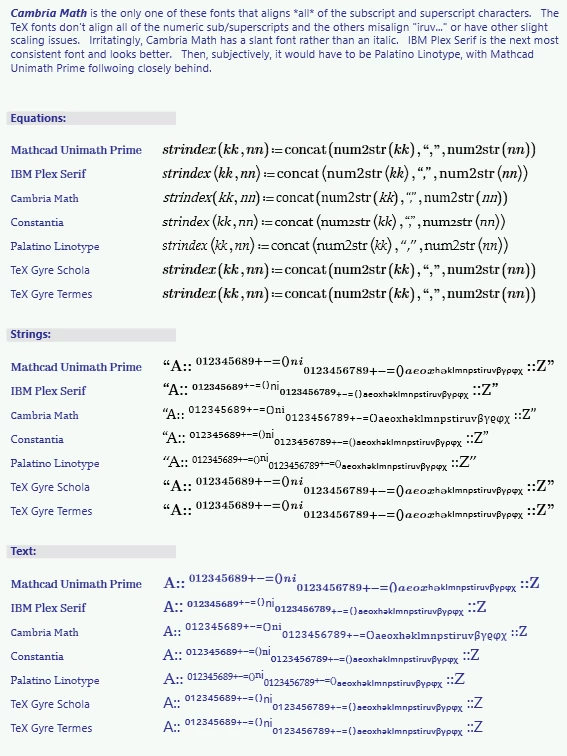
The only ways around it that I've found are to use the Unicode subscript characters (if they exist for the character of your choice) or to change the font size to at least indicate they're not "main" characters.


The Unicode characters are not all grouped together in one Unicode block; they're scattered around according to the seeming whim of the Unicode committee.   Fortunately, the most common maths subscripts are available.  However, you've got to choose your font wisely; because of the mixed grouping, and the choices of the font designers, you can find that their sizes and positioning may vary.
 

2022 04 13 a.png


Stuart

1 reply

23-Emerald V
April 13, 2022

@TikkaMasala wrote:

Hi

After converting some Mathcad 15 sheets to Prime 7, I noted that all subscripts in texts were converted to plain text font. There are some text editing tools in Prime 7, but I think possibility of usage of subscripts and superscripts in texts is must. I really hope these font options will be possible in near future...


Or have I missed some way to get these font options working in Prime 7?


As attached is a screenshot from Mathcad 15 where these font types were available.


I believe they might be scheduled for one of the next 3 releases - https://community.ptc.com/t5/PTC-Mathcad/PTC-Mathcad-Prime-Roadmap-2021-update/m-p/738684 or 


The only ways around it that I've found are to use the Unicode subscript characters (if they exist for the character of your choice) or to change the font size to at least indicate they're not "main" characters.


The Unicode characters are not all grouped together in one Unicode block; they're scattered around according to the seeming whim of the Unicode committee.   Fortunately, the most common maths subscripts are available.  However, you've got to choose your font wisely; because of the mixed grouping, and the choices of the font designers, you can find that their sizes and positioning may vary.


2022 04 13 a.png


Stuart

23-Emerald V
April 13, 2022

Find attached the Mathcad Prime Express 7.0 worksheet that contains the subscript characters - makes it easier to copy and paste them.


Stuart
