14-Alexandrite
November 3, 2025
Solved

Textbox results in MCP10 vs MP11

  • November 3, 2025
  • 1 reply
  • 449 views

Hello All,

I’m not sure why the textbox result in P10 doesn’t have a red box around it, while the one in P11 does.


In P10
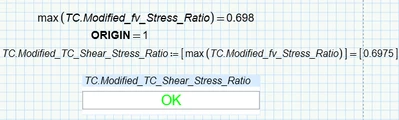
SFares_0-1762202215361.png

In P11

SFares_1-1762202262565.png

SFares_2-1762202286959.pngSFares_3-1762202317459.png


Regards,
Sam


Best answer by Werner_E

Hard to replicate. Sure would help if you post a small dummy worksheet (in P10 format) which works OK in P10 but fails in P11.


It may have to do with ORIGIN not set to 0 and if you using 11.0.0.0 or the current 11.0.1.0.

As I understand there was a bug with advanced controls which was partially fixed in 11.0.1.0 but a problem with ORIGIN not set to its default value zero remained and will be fixed in P12

See here Advanced Controls - List Box - selection not prese... - PTC Community

and here Re: Dependent Listbox doesn't retain value on save... - PTC Community

1 reply

Werner_E25-Diamond IAnswer
25-Diamond I
November 3, 2025

Hard to replicate. Sure would help if you post a small dummy worksheet (in P10 format) which works OK in P10 but fails in P11.


It may have to do with ORIGIN not set to 0 and if you using 11.0.0.0 or the current 11.0.1.0.

As I understand there was a bug with advanced controls which was partially fixed in 11.0.1.0 but a problem with ORIGIN not set to its default value zero remained and will be fixed in P12

See here Advanced Controls - List Box - selection not prese... - PTC Community

and here Re: Dependent Listbox doesn't retain value on save... - PTC Community

SFares14-AlexandriteAuthor
14-Alexandrite
November 3, 2025

I am using 11.0.1.0. I have attached two small sheets for comparison.


Thank you, Werner!


Sam

25-Diamond I
November 3, 2025

Ah, I wasn't sure if I understood correctly what was said in the links I provided, but now its clear to me that it seems to be a new bug introduced in the interims version 11.0.1.0.

I have still installed 11.0.0.0 because not knowing what has changed or been improved/fixed I was not sure if it would be worth installing 11.0.1.1.

Your sheets works OK not only when opened in 10.0.1.0, but also in 11.0.0.0.

But I see when I open your P11 sheet that you experienced an error in your 11.0.1.0 (it goes away in 11.0.0.0 after recalculation).

So I fear you will have to wait for P12 for a fix and in the meantime you would have to use the workaround described in the thread I linked to. As I understood its necessary to temporally set ORIGIN to zero in front of an advanced control.  Hope it works for you.