Best answer by Werner_E

You can't have a variable/constant and a function using the same name. Actually you can use the same name if you use different styles, but i would suggest that you use different names.


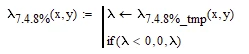
If you had in mind to just cut off negative values and replace them for zero, you may end the solve block with

Werner_E_0-1606822158695.png


and use something like

Werner_E_0-1606821727810.png

You could also use

Werner_E_1-1606821751711.png

but thats inefficient because the solve block is called twice that way.

2 replies

Werner_E25-Diamond IAnswer
25-Diamond I
December 1, 2020

You can't have a variable/constant and a function using the same name. Actually you can use the same name if you use different styles, but i would suggest that you use different names.


If you had in mind to just cut off negative values and replace them for zero, you may end the solve block with

Werner_E_0-1606822158695.png


and use something like

Werner_E_0-1606821727810.png

You could also use

Werner_E_1-1606821751711.png

but thats inefficient because the solve block is called twice that way.

1-Visitor
December 1, 2020

Is possibility to solve equation with precision 1*10-6 or higher?Now is 1*10-2 if we use F and G new guidelines in sample.

25-Diamond I
December 1, 2020

@ptc-3682623 wrote:

Is possibility to solve equation with precision 1*10-6 or higher?Now is 1*10-2 if we use F and G new guidelines in sample.


Not sure what you mean?

What you do does not make much sense to me as you set up a solve block to calculate a specific value but at the end you assign the value manually with just three valied digits (

How do you know that the precision isn't high enough and what do F and G have to do with the precision?

Mathcad like many other numeric math programs work by storing its number in IEEE format. So most programs suffer from the very same precision lack. Symbolic math usually is done with much higher precision but has its own drawbacks.


1-Visitor
December 7, 2020

I'm going to present only Sigmaxxp, for λ>0 How can I do?

25-Diamond I
December 7, 2020

The function you define is dependent on THREE arguments (lambda, x and y). You can only plot functions dependent on TWO arguments with the 3D plot. Thats exactly what the error message is telling you.


Its still confusing that you use the very same name for a function and soon after for a variable.

1-Visitor
December 13, 2020

Now is ok, but I'm returning to my question how can I plot 3D graphs only for lambda >0. This means graphs of sigmaxx must to be similar to lambda where we plot only lambda>O. We need plot strees only in this parts where lambda >0. If this is not clear what I want to do ask me.