14-Alexandrite
October 22, 2022
Solved

The corresponding or associated yield mode with the smallest value, Mathcad15

  • October 22, 2022
  • 1 reply
  • 1513 views

Hello,

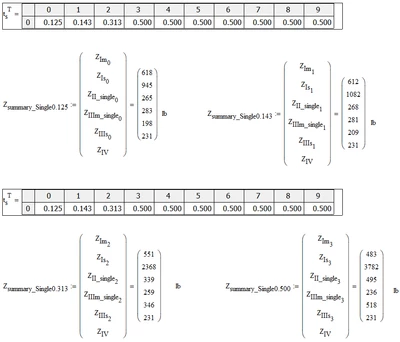
In mathcad-15,  Is there away i can get it to display yield mode (Z1m, Z1s, ZII, ZIIIm,ZIIIs...) that associated with or corresponding to the smallest value? For example, when ts=0.125, the smallest value is (198), so the yield mode (ZIIIs), and when ts=0.313, the yield mode corresponding to the smallest value (231) is (ZIV) and so on. 

Thank you,

Sam
SFares_0-1666449937225.png


Best answer by Werner_E

Please attach your worksheet as well!


To get the minimum value of the vector use the "min(..)" function.

If your goal is to get the variable name of the minimum value, thats not possible.

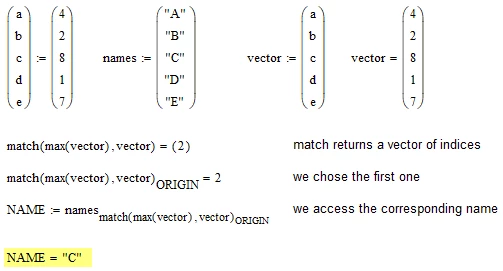
BUT you can get the index of the minimum value using the function "match".

You may setup a vector with the names in strings and using the value you get using match access and display the variable name that way. But you will have to create the vector with the names a strings manually yourself.


Something like this:

Werner_E_0-1666458467956.png


1 reply

Werner_E25-Diamond IAnswer
25-Diamond I
October 22, 2022

Please attach your worksheet as well!


To get the minimum value of the vector use the "min(..)" function.

If your goal is to get the variable name of the minimum value, thats not possible.

BUT you can get the index of the minimum value using the function "match".

You may setup a vector with the names in strings and using the value you get using match access and display the variable name that way. But you will have to create the vector with the names a strings manually yourself.


Something like this:

Werner_E_0-1666458467956.png


SFares14-AlexandriteAuthor
14-Alexandrite
October 23, 2022

Thanks a lot Werner!

I  followed the steps in your answer. The only question I have is the word" ORIGIN". I typed in the word "ORIGIN",at the end of  match function as shown below, but in your answer  the word "ORIGIN" appears as a subscript. Did i do it incorrectly. i can send you the sheet if you need it. Thanks again.


Sam

SFares_0-1666553292791.png


25-Diamond I
October 23, 2022

First of all - sorry, I notice just now that I mistakenly uses "max" in my screenshot while I should have used "min" instead. But as I can see you noticed that yourself anyway.


"match" returns a vector of index values even though it might be just one value. If the minimum value occurs twice or more in the vector, "match" would return a vector with all the corresponding indices. Because we need just one index (and I guess this situation probably will not occur in your application) I'd like to chose the first one. The number of the first entry in a vector is ORIGIN. By default ORIGIN has the value 0 but you could change it to any (integer value) you want. On obvious choice would be ORIGIN:=1.

As I wanted my suggestion to be independent on the way you may have set ORIGIN, I used this system variable instead of 0 (or 1).

And this has to be a vector index.


But it looks that you did all correctly. But because the name of your vector contains a literal subscript, the displayed expression simply look like ORIGIN is not subscripted but actually it is.

Something like

Werner_E_1-1666555381042.png