1-Visitor
August 19, 2020
Solved

The File is corrupted

  • August 19, 2020
  • 2 replies
  • 2374 views

Can anyone help me.

My Mathcad file is corrupted and I font know how to fix it. I had a look at the text file but couldn't see any error message. I really appreciate it if someone can fix the issue.

Thanks 

Bez

Best answer by Werner_E

I had to delete one region which Mathcad identified as incorrect. The rest of the file seems fine. Find it attached.

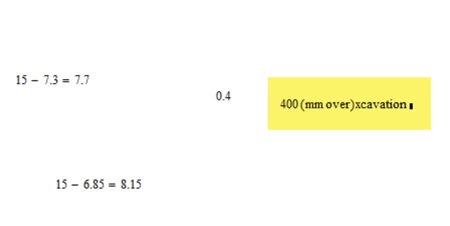
The deleted region is also attached as xml file. The error occurred in line 16 of this file after "</ml:apply>". This was line 4174 in the original file.


EDIT: Ah, I see that Luc was faster. Here's the region in question taken from his file (page 9, right side). Doesn't look like something vital:

Werner_E_0-1597837463904.png


2 replies

23-Emerald IV
August 19, 2020

Here https://community.ptc.com/t5/PTC-Mathcad/Can-t-see-your-sheet-but/m-p/636482 is a tool that will show the contents of your file in some cases where Mathcad 15 will report an error. It takes some time, but will open your file.

I attempted to repair your sheet file, the result is attached.

Check the file, I hope it works now.

Somewere there's an expression involving (over*mm)  or (mm*over) that I needed to change.

Next time, provide the information on the error message that Mathcad gives, especially location of the error.


Success!
Luc

Behzad1-VisitorAuthor
1-Visitor
August 19, 2020

Hi Luc

Thanks very much, the file is working now.

I don't how to thank you. you saved a day of my work.

Werner_E25-Diamond IAnswer
25-Diamond I
August 19, 2020

I had to delete one region which Mathcad identified as incorrect. The rest of the file seems fine. Find it attached.

The deleted region is also attached as xml file. The error occurred in line 16 of this file after "</ml:apply>". This was line 4174 in the original file.


EDIT: Ah, I see that Luc was faster. Here's the region in question taken from his file (page 9, right side). Doesn't look like something vital:

Werner_E_0-1597837463904.png


Behzad1-VisitorAuthor
1-Visitor
August 19, 2020

Hi Werner.

Thanks very much for your help.

It is really appreciated.

Cheers Bez