24-Ruby IV
November 19, 2015
Solved

The issue with the analysis of data

  • November 19, 2015
  • 7 replies
  • 2904 views

As a source of initial data, I use Excel files. When trying to find the values in the table by using "hlookup" function is working for a file "Data 1" and does not work in the case of the data from the file "Data 2". Why?

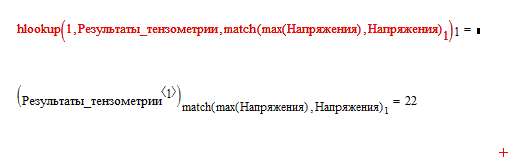
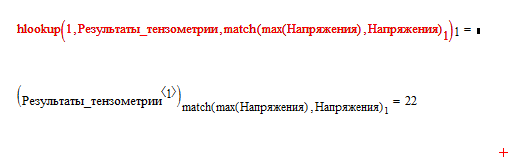
With "Data 1":
Pic_1.png

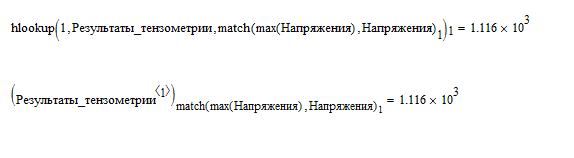
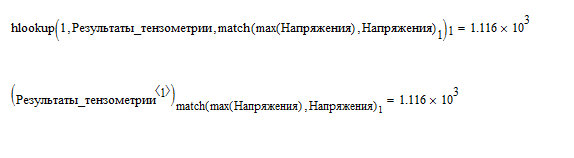
With "Data 2":

Pic_2.png

Best answer by StuartBruff

VladimirN. wrote:

As a source of initial data, I use Excel files. When trying to find the values in the table by using "hlookup" function is working for a file "Data 1" and does not work in the case of the data from the file "Data 2". Why?

With "Data 1":

Pic_1.png

With "Data 2":

Pic_2.png

Just to add to what Mike's written (I haven't looked at his worksheets yet), for Data 1, hlookup tries to find 1 in the first row of Результаты_тензометрии, which it does in column 1.  The  match function returns 126, so hlookup then returns the value in row 126 of column 1.

However, in Data 2, 1 doesn't occur in row 1 (only 13 and 4.39 are in row 1), so it flags an error up.

Stuart

7 replies

1-Visitor
November 19, 2015

Is this what you wanted to do?

Mike

1-Visitor
November 19, 2015

Here's another version using lookup.

Mike

1-Visitor
November 19, 2015

Remember hlookup looks in the first row of a matrix.

From the help:

hlookup(z, A, r) Looks in the first row of a matrix, A, for a given value, z, and returns the value(s) in the same column(s) in the row specified, r. When the value(s) are returned, they appear in a vector, starting from the left.

Mike

23-Emerald V
November 19, 2015

VladimirN. wrote:

As a source of initial data, I use Excel files. When trying to find the values in the table by using "hlookup" function is working for a file "Data 1" and does not work in the case of the data from the file "Data 2". Why?

With "Data 1":

Pic_1.png

With "Data 2":

Pic_2.png

Just to add to what Mike's written (I haven't looked at his worksheets yet), for Data 1, hlookup tries to find 1 in the first row of Результаты_тензометрии, which it does in column 1.  The  match function returns 126, so hlookup then returns the value in row 126 of column 1.

However, in Data 2, 1 doesn't occur in row 1 (only 13 and 4.39 are in row 1), so it flags an error up.

Stuart

VladimirN24-Ruby IVAuthor
24-Ruby IV
November 20, 2015

Yes, I missed in the initial data "1". Thank you.

23-Emerald V
November 20, 2015

пожалуйста, нет проблем, владимир


Stuart