

1-Visitor
January 9, 2013
Solved

This value must be a vector

  • January 9, 2013
  • 3 replies
  • 9598 views

Hi,

I am receiving 'This value must be a vector' error eventhough the expression is vector already. Please see the attached snippet.

Thanks.

Best answer by AndyWesterman

Hi Yigit,

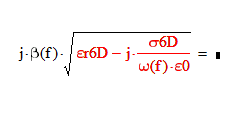
I think that the problem is caused by the square root function.

Capture.PNG

Complains that it must be a vector,

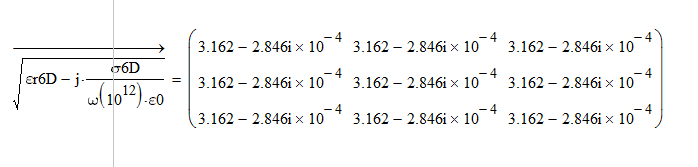
Using the vector-ise operator (<CTRL> -) (and also setting f = 10^12 ) gives

Capture1.PNG

Also added into the file are simple examples of the square root failing to calculate

Regards

Andy

3 replies

12-Amethyst
January 9, 2013

I used the Trace Error feature and it led to the offending variable. It is actually a nested array, not a vector.

24-Ruby III
January 12, 2013

Hi Yigit,

I'm not sure what you want to achieve. Maybe attachment will help you.

12-Amethyst
January 14, 2013

Hi Yigit,

I think that the problem is caused by the square root function.
Capture.PNG

Complains that it must be a vector,

Using the vector-ise operator (<CTRL> -) (and also setting f = 10^12 ) gives
Capture1.PNG

Also added into the file are simple examples of the square root failing to calculate

Regards

Andy

yeet1-VisitorAuthor
1-Visitor
January 14, 2013

I had figured it's the square root function but I couldn't figure out 'why' it causes the error. I had used the same function with the same notation without error in my previous sheets, this one threw this error. Weird behavior I suppose.

12-Amethyst
January 14, 2013

As you may see from the previous attachment: square root seems to handle single column vector, but single row & matrix forms cause it to throw an error.

This discrepancy should probably be caonsidered as a bug, even though it can be corrected by vectorisation.

Regards

Andy