

Solved

Werner_EAnswer
25-Diamond I
March 7, 2020
Apart from what Fred already spotted, some more remarks:
- You may consider setting the system variable ORIGIN to 1, instead of the default value 0. You can do this either by writing ORIGIN:=1 at the top of your sheet or via the menu.
As an alternative you may stick with ORIGIN=0 and change your program to reflect the fact that the first vector element has index nr 0 (loop from 0 to n-1 instead of 1 to n). - Instead of returning a 4x3 matrix or a 12*1 vector (I am assuming you already adopted my remark #1) you may consider returning a nested vector. A vector with the three calculated vectors as elements.
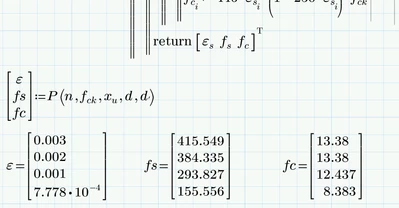
- A severe failure was made by you because you type square brackets in your calculations. Typing square brackets automatically define e vector. You have to use normal parenthesis instead (in some cases they may be displayed as square brackets which is admittedly confusing)
Find a attached a working work sheet (Prime 6). I have assumed that you wanted the full vectors as result. If you really only want the last values (as you created your program initially) you replace epsilon by epsilon[i in the return statements.
Furthermore your program is quite redundant and sure can be written much shorter, but I haven't bothered doing so 😉