1-Visitor
Jan 26, 2025 6:23 PM UTC
Solved

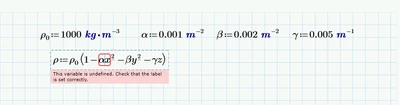
This variable is undefined. Check that the label is set correctly. Express Prime

Hey all,

I'm a mech e student using mathcad for the first time for my thermodynamics class.

Been having a tricky time figuring things out, and already hit a wall. Not really sure how to figure this out, and I don't recall seeing any previous topic that helped, so any assistance would be appreciated.

Attached is a screenshot of the issue.
what do.png

Werner_E
Werner_EAnswer
25-Diamond I
Jan 26, 2025 9:14 PM UTC

You have to type a multiplication sign (*) between alpha and x as otherwise alphax is seen as a variablename on ot own which, of  course, is nowhere defined in your sheet. Same for beta*y and gamma*z.

And of course you must have defined values for x, y and z as otherwise you will again see the error message because of the undefined variable x.

In case you ant rho be seen as a function in x,y and z, you will have to write rho(x,y,z):= ...

For future question its abetter idea to attach the worksheet itself additionally to the provided screenshot. If you don't use the latest version of Prime you should also state which version of Prime you are using.

4 replies

Werner_E
Werner_E25-Diamond IAnswer
25-Diamond I
Jan 26, 2025 9:14 PM UTC

You have to type a multiplication sign (*) between alpha and x as otherwise alphax is seen as a variablename on ot own which, of  course, is nowhere defined in your sheet. Same for beta*y and gamma*z.

And of course you must have defined values for x, y and z as otherwise you will again see the error message because of the undefined variable x.

In case you ant rho be seen as a function in x,y and z, you will have to write rho(x,y,z):= ...

For future question its abetter idea to attach the worksheet itself additionally to the provided screenshot. If you don't use the latest version of Prime you should also state which version of Prime you are using.

Translate
1-Visitor
Feb 10, 2025 3:11 PM UTC

Thank you for your response! That was, in fact, the problem. Apologies for not having said so earlier--coursework has kept me very busy.

Translate
23-Emerald V
Jan 26, 2025 9:15 PM UTC

Prime complains that the variable ax is not defined. You probably forgot to type a multiplication symbol  ( * ) between the a and the x...

Maybe same for beta and y and gamma and z.

In general it's best if you attach the Prime worksheet AND state which version you are using...

Success!

Luc


Translate
SPaulis
14-Alexandrite
Feb 10, 2025 3:59 PM UTC

@LK_12809976, also consider using "Scaling" (Ctrl-Shift-U) instead of multiplication (*).  It is actually identical to the 'asterisk' multiplication but does not show the dot.  With all the textbooks and papers showing multiplication as implied (ax­² instead of a­•x²), I do not understand why Mathcad defaults to the visible dot when you press the asterisk.  I only use the visible dot when I am multiplying two numbers (i.e. 2•5a).

Translate
"It's OK to fall in love with your heart, but you design with your head." Omer W. Blodgett