1-Visitor
November 14, 2015
Solved

This variable is undefined with ODEsolve?

  • November 14, 2015
  • 2 replies
  • 3809 views

Hey guys,

I am a grad student that is brand new to mathcad.  I've tried looking at other solutions, but unfortunately, I just can not find what I am doing wrong.  I am looking at an example problem that was  done in class and am trying to recreate it (a pic is attached).  As far as I can tell, I have exactly the same program this far (my sheet is attached), but mine gives an error of "this variable is undefined." If someone could check it over and point out what I am doing wrong, I would really appreciate it!

Thanks,

Caitlin

Best answer by Werner_E

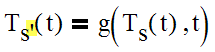
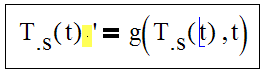
The problem is the prime symbol, which you have placed at the wrong position (after the argument parentheses). If you look at your expression closely, you may see a small multiplication sign, so Mathcad is multiplying the function outcome T.s(t) with the prime symbol which will not work.

You have to place the prime symbol right after the function name (before the argument parentheses). As you function name uses a literal index, the prime symbol will show up subscripted, too, which looks rather ugly

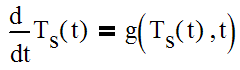
So probably its better to use the full differentiation operator as was done in the original work which you had posted a (very poor quality) picture of

You probably know that you must use the symbol from the calculus tools palette and are not allowed to just type a normal fraction.

Werner

@Stuart: The referenced file is not absolutely necessary, as we can assign the variable c.ps any reasonable value - I used the 4180 J/(kg K) from the picture even though the values of UA and m.s were chosen different from the pic by Caitlin.

2 replies

23-Emerald V
November 14, 2015

cswec wrote:

Hey guys,

I am a grad student that is brand new to mathcad.  I've tried looking at other solutions, but unfortunately, I just can not find what I am doing wrong.  I am looking at an example problem that was  done in class and am trying to recreate it (a pic is attached).  As far as I can tell, I have exactly the same program this far (my sheet is attached), but mine gives an error of "this variable is undefined." If someone could check it over and point out what I am doing wrong, I would really appreciate it!

Thanks,

Caitlin
Hi Caitlin,

Unfortunately, the picture appears to show the correctly working program, so I can't tell much from it.   However, I can't tell anything from your worksheet either, because it references another worksheet "C:\Users\Caitlin\Documents\EGR 7800\water properties.xmcd", which  I'm guessing this worksheet defines the function cpw?    So what I see is this:

Any chance you could post the water properties.xmcd worksheet, please? (It might be worth opening the worksheet to check that it doesn't have any dependencies itself).

Thanks,

Stuart

cswec1-VisitorAuthor
1-Visitor
November 14, 2015

Stuart,

I'm sorry.  I totally forgot about the reference. The picture does in fact show the working program shown in class, which my sheet should mirror (besides two numbers being different: the ms and the UA).  Attached is the water properties sheet.

Thank you for looking!  I really appreciate any help.

Thanks!

Caitlin

24-Ruby IV
November 15, 2015

cswec wrote:

Stuart,

I'm sorry.  I totally forgot about the reference. The picture does in fact show the working program shown in class, which my sheet should mirror (besides two numbers being different: the ms and the UA).  Attached is the water properties sheet.

Thank you for looking!  I really appreciate any help.

Thanks!

Caitlin

Sorry, your data at what pressure?

wspCPPT.png

Werner_E25-Diamond IAnswer
25-Diamond I
November 15, 2015

The problem is the prime symbol, which you have placed at the wrong position (after the argument parentheses). If you look at your expression closely, you may see a small multiplication sign, so Mathcad is multiplying the function outcome T.s(t) with the prime symbol which will not work.

You have to place the prime symbol right after the function name (before the argument parentheses). As you function name uses a literal index, the prime symbol will show up subscripted, too, which looks rather ugly

So probably its better to use the full differentiation operator as was done in the original work which you had posted a (very poor quality) picture of

You probably know that you must use the symbol from the calculus tools palette and are not allowed to just type a normal fraction.

Werner

@Stuart: The referenced file is not absolutely necessary, as we can assign the variable c.ps any reasonable value - I used the 4180 J/(kg K) from the picture even though the values of UA and m.s were chosen different from the pic by Caitlin.

24-Ruby IV
November 15, 2015

May be so!

But it is one problem for Mathcad Prime with units in Odesolve.

See please more Thermal Engineering studies with Excel, Mathcad and Internet

classproblem-1.png