
Solved
To change units in Matrix Column
In my HVAC load calculation, I have the units in the matrix column in Watts.
But, I need units to be Btu/hr.
I tried various options without success. I request help.
Pl. see below.
Also attached Mathcad file.
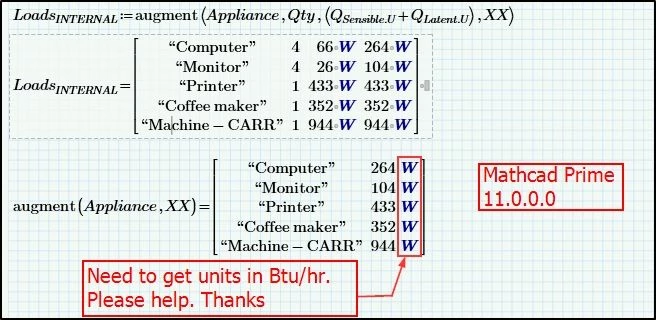

In my HVAC load calculation, I have the units in the matrix column in Watts.
But, I need units to be Btu/hr.
I tried various options without success. I request help.
Pl. see below.
Also attached Mathcad file.
The sad news is: Prime still can't do that!
You can only change the unit for all values in a matrix by using the placeholder after the matrix.
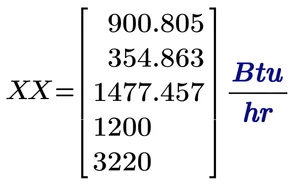
But this looks most often silly in case the matrix contains quantities of different dimensions
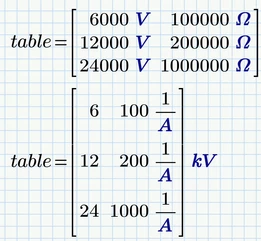
and it would fail if the matrix contains strings as in your case, because you can't apply units to a string.
Inside of a matrix Prime always will only show the standard unit, depending on the unit system you select and whether you check "Base Units" or not.
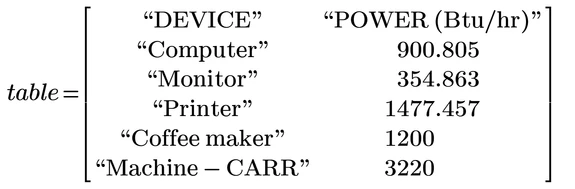
So the best you can achieve is to strip the unit (divide by the desires unit) and add a header indicating the unit. That's not really satisfactory, of course, especially when we consider that this is software that is (rightly) proud of its ability to handle units natively..

Enter your E-mail address. We'll send you an e-mail with instructions to reset your password.