
14-Alexandrite
September 23, 2020
Question

Transformation matrix

  • September 23, 2020
  • 3 replies
  • 7395 views

Hello

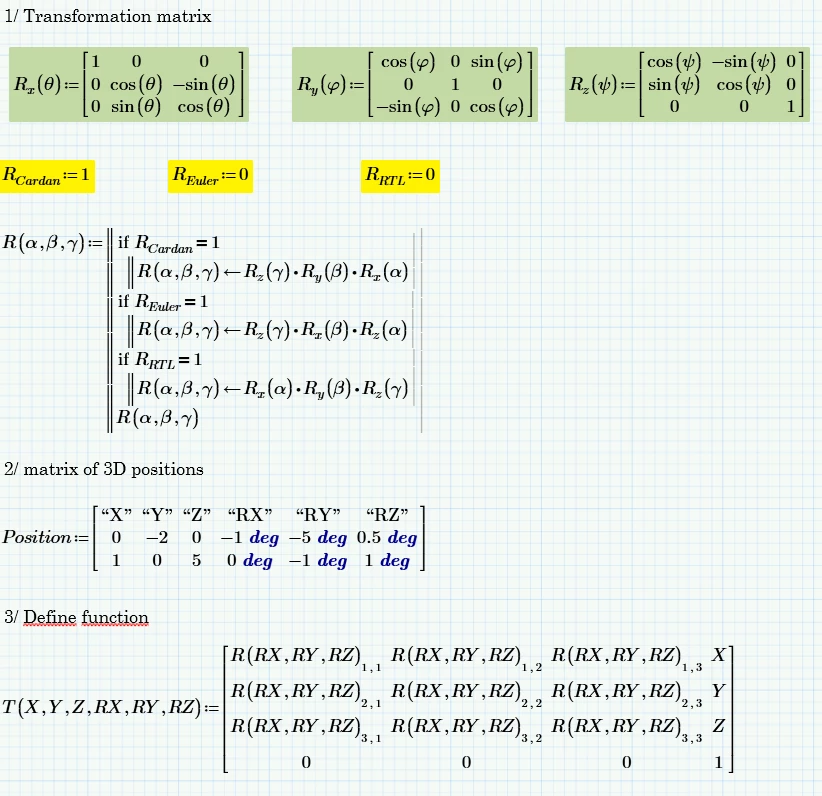
i make a worksheet for calculate transformation matrix:
Capture d’écran 2020-09-23 145817.png


first i write Rx Ry Rz rotation matrix

in second time (it's not mandatory), i define passage order of passage. by habit i use Cardan (or reverse RTL)


after i have the matrix position : X Y Z RX RY RZ

(in this matrix i have 1 line or over 1000 lines)


I define a transformation function, in this i use an homogeneous matrix

in this matrix, the first 3x3 are the rotation matrix (matrix of cosine) and the last matrix 3x1 are the position matrix


Now , my problem:


I want to calculate all transformation matrix (with T function) for all Position matrix

 exemple:

T(0,-2,0,-1,-5,0.5)

T(1,0,5,0,-1,1)

and other ...


and finally i want 1 matrix with all submatrix


3 replies

25-Diamond I
September 23, 2020

1) By default vectors and matrices start numbering their elements with 0, not with 1 as you thought. So your function T() won't work for a single set of six values (you should always test your function!).
Fortunately there is a system variable ORIGIN and if you set it to 1 by typing ORIGIN:=1 at the top of the sheet, or use a global assignment anywhere on the sheet or set the variable via the menu ("Calculation" ribbon) then your sheet works OK.


2) Here is one possible way to achieve what you demanded:

Werner_E_0-1600869351750.png


P6 worksheet attached


XDN14-AlexandriteAuthor
14-Alexandrite
September 23, 2020

Ok for your first note , i use origin =1 in ribbon

and i erase first line in position matrix (i write the first line in this matrix just for understanding)

i watch the rest !😃


25-Diamond I
September 23, 2020

@XDN wrote:

Ok for your first note , i use origin =1 in ribbon


Fine, its up to you how you handle this.


and i erase first line in position matrix (i write the first line in this matrix just for understanding)

i watch the rest !😃


Not necessary to delete the line with the columns headers. But if you do you would have to change my "O+1" for just "O" and my "i-1" for "i" in the calculation of All_Ts.


Keep on watching 😉

23-Emerald IV
September 23, 2020
23-Emerald IV
September 23, 2020

Incidentally...

Are you sure that the Euler transformation does not use Ry ?


Luc

XDN14-AlexandriteAuthor
14-Alexandrite
September 23, 2020

it is complicated because there is no real standard about this.

Eleur don't use Ry because use 2 . Rz with another angle parameter

some people calling all order passage 'Euler angle'  even for Cardan, RTL (roll,pitch,yaw)


another solution!  use quaternion 😅 but i don't know this 😉


it's good for me with Werner's solution (your solution is more compact, but I understand Werner's writing better)

Capture d’écran 2020-09-23 171203.png


XDN14-AlexandriteAuthor
14-Alexandrite
September 24, 2020

first of all a big thank you for your precious advice which helps me to learn Mathcad. It's not easy forme, but i try and i hold on. And excuse me for my approximate language.


Now i update my worksheet, but I'm breaking my head over how to write. I know that i want ... but i can't write it.

Please see the attached file, i can to explain it .

Capture1.png


Capture2.png


Capture3.png


Capture4.png