1-Visitor
February 13, 2026
Solved

Troubles with units in plots

  • February 13, 2026
  • 1 reply
  • 122 views

Hi Everyone,


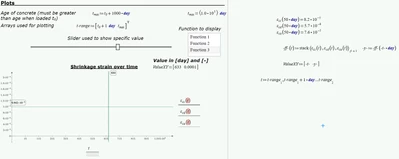
I have tried to implement a slider combined with markers to display values from my plot. However, by doing this I get an error for plotting my functions themselves, and I believe it might be because of the units.

I have attached a picture and the file itself below.
aahc_0-1770965245719.png

I am using mathcadprime 10.0.1. I hope you can help!


Best regards,

Adam
Best answer by Werner_E

No, it's neither the slider nor the units - its much simpler 😉

Prime reads from top down and from left to right. 

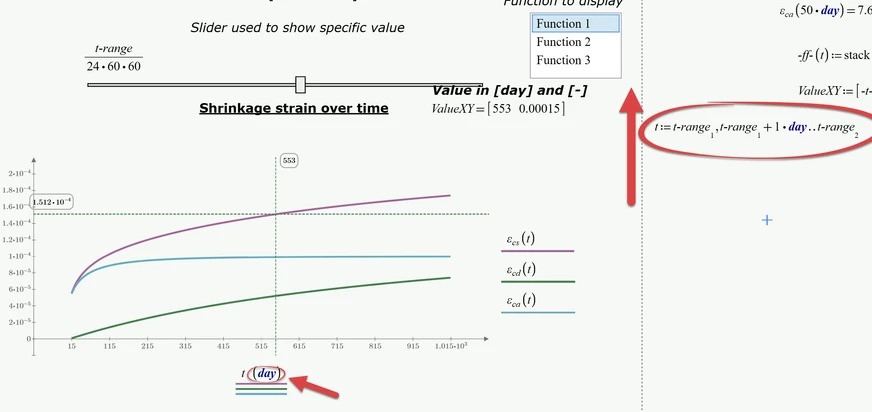
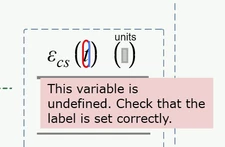
The (unfortunately invisible) reference point of your plot region is a little bit higher than the definition of the range "t" at the right of your plot. That way the range "t" is not yet known by the plot region and that's exactly what the error message is telling you (but checking the labels does not help in this case);

Werner_E_1-1770966796973.png


So the simple solution is to move the definition of "t" upward until the plot works OK (moving the plot region further down would work OK, too, of course).

Of course you also will have to manually set the unit "day" for the x-axis:

Werner_E_0-1770966254478.png

I also changed colors and line width for better visability.


1 reply

Werner_E25-Diamond IAnswer
25-Diamond I
February 13, 2026

No, it's neither the slider nor the units - its much simpler 😉

Prime reads from top down and from left to right. 

The (unfortunately invisible) reference point of your plot region is a little bit higher than the definition of the range "t" at the right of your plot. That way the range "t" is not yet known by the plot region and that's exactly what the error message is telling you (but checking the labels does not help in this case);

Werner_E_1-1770966796973.png


So the simple solution is to move the definition of "t" upward until the plot works OK (moving the plot region further down would work OK, too, of course).

Of course you also will have to manually set the unit "day" for the x-axis:

Werner_E_0-1770966254478.png

I also changed colors and line width for better visability.


aahc1-VisitorAuthor
1-Visitor
February 13, 2026

Hi Werner_E,


You are completely right, thank you so much for the help!


Best regards,

Adam