1-Visitor
December 2, 2022
Solved

Trying to set up a combobox displaying two columns

  • December 2, 2022
  • 2 replies
  • 6010 views

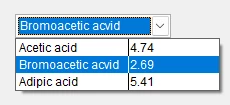
I am trying to get a control looking something like this (from another piece of software) PaulN_0-1669997469713.pngThe nearest I have been able to get is this 
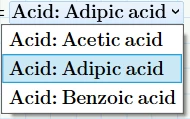
PaulN_1-1669997602045.png

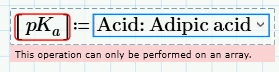
And even this is showing an error

PaulN_2-1669997717850.png

I have a feeling that what I want is not possible but it would be great if I could be proved wrong!



Best answer by ttokoro

I added all data from excel sheet.

Prime 8 sheet attached.


2 replies

12-Amethyst
December 2, 2022

Do not use [ pKa ] - use pKa only.


regards 

Owe

PaulN1-VisitorAuthor
1-Visitor
December 2, 2022

That's great but what about getting the dropdown to show the values (in my example 4.74, 2.69 and 5.41) as well as the names - I think that might be a problem which would be a showstopper for me.

DJNewman
18-Opal
December 2, 2022

Well, you could cheat the combo box and just put the value in the name.


DJNewman_0-1670002458698.png


But otherwise the fastest way to check all of the values of the combo box, besides evaluating its contents below it, is to right-click and select edit.

PTC Marketer for Creo and Mathcad. I run their YouTube channels, some Creo campaigns, and all Mathcad campaigns and communications.
ttokoro
21-Topaz I
21-Topaz I
December 3, 2022

You can copy & past this matrix by select all to combo box.

image.pngimage.pngimage.pngimage.png

t.t.
PaulN1-VisitorAuthor
1-Visitor
December 3, 2022

Thank you