

10-Marble
July 21, 2022
Solved

Unable to plot

  • July 21, 2022
  • 2 replies
  • 1580 views

Even providing all the inputs the lot will still not plot 

Best answer by Werner_E

Primes auto-labelling, especially in connection with units and symbolic evaluation most of the time is a PITA.

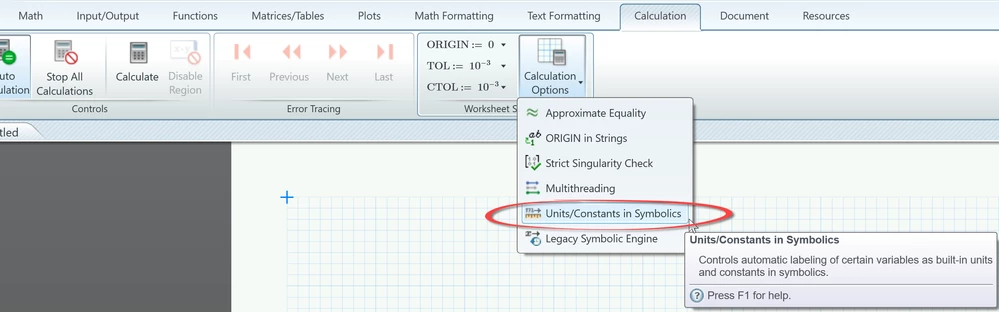
But in case of your problem, the simple solution is to turn on "Units/Constants in Symbolics" in the calculation options.
B1.png

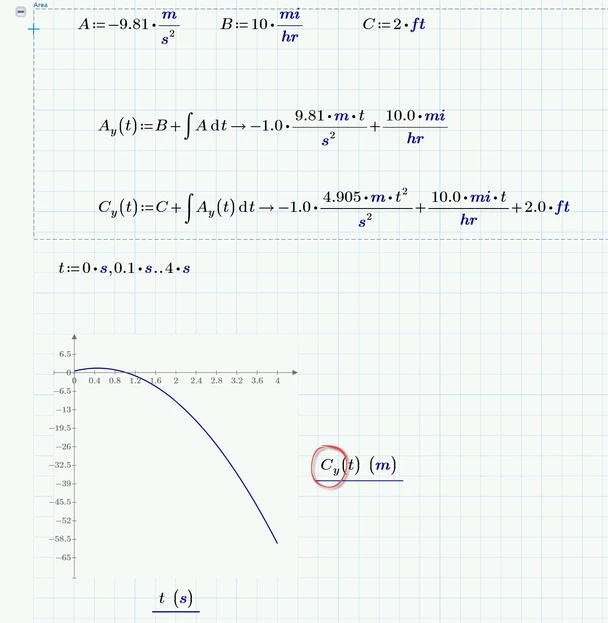
You can leave your worksheet unchanged otherwise - despite changing P.y to C.y of course:
B2.png

2 replies

23-Emerald IV
July 21, 2022

You define Ay(t) and Cy(t), and want to plot Py(t),,,?


Success!
Luc

10-Marble
July 21, 2022

My bad it is Cy(t) against t. I also tried to add the units but still getting the error 

23-Emerald IV
July 21, 2022

OK. You're using symbolic evaluation in your definitions of Ay and Cy. Prime is capable of such things, but (too) often creates a mess.

LucMeekes_1-1658433807587.png


See how some of your units remain units (bold blue italic) and some don't.

The better way to work with symbolics is to stay symbolic until you need to input values. Something like this:

LucMeekes_0-1658433587747.png

Success!

Luc

Werner_E25-Diamond IAnswer
25-Diamond I
July 21, 2022

Primes auto-labelling, especially in connection with units and symbolic evaluation most of the time is a PITA.

But in case of your problem, the simple solution is to turn on "Units/Constants in Symbolics" in the calculation options.

B1.png

You can leave your worksheet unchanged otherwise - despite changing P.y to C.y of course:

B2.png