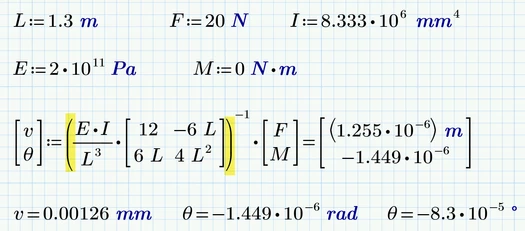
Looking at Terry's reply I notice, that he is taking the inverse of the product of the first two factors, while in you pic its only taken from the second, the matrix.
Doing like Terry suggested gives you the units you expect .
Mathcad always displays its results in the base units, which for length are meter in your setup.
While you can change that with single variables by simply overwriting the displayed unit with the unit you'd like to see, thats not possible with a vector where the elements have different dimensions.
But you can omit the last = sign and instead write v.2= and theta.2= and you can change the units in the two results as you like.
For future question please include your worksheet and state which version you are using.
This is an engineering stiffness problem where the stiffness matrix has different units for different elements.
In Prime 6.0 it is possible to have such a matrix.
In Mathcad 15 it is not possible to have such a matrix.
The problem must be approached with a consistent unit system. Prime uses by default "m" metres and "N" which are inconsistent units and will give errors in the calculation.
You must force the unit consistency "mm", "mm4", "N", "N.mm", "N/mm2" etc when defining the stiffness matrix. At the result you can define the mm and rad.
Mathcad 5 enclosed that can be converted to Prime 6
Looking at Terry's reply I notice, that he is taking the inverse of the product of the first two factors, while in you pic its only taken from the second, the matrix.
Doing like Terry suggested gives you the units you expect .