1-Visitor
November 1, 2023
Solved

Unit Issue with Exponents

  • November 1, 2023
  • 4 replies
  • 2398 views

Hi Everyone,


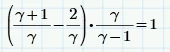
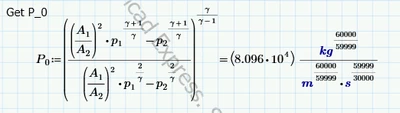
Any chance anyone has an idea why I am getting odd units?  I did the exponent by hand below just to check and it comes up with 1 like it should.  


Thanks in advance!

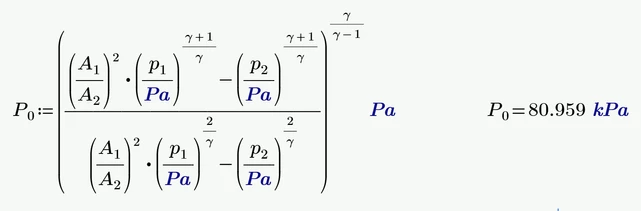
formula:

JH_10068722_0-1698817165180.png

Exponent check:

JH_10068722_1-1698817200429.png


Version: PTC Mathcad Prime Express 9.0.0.0

Best answer by Werner_E

You found a severe bug in Prime.

Somebody should report it to PTC support.

As you are using the free Express, you probably are not eligible to to so. PTC seems not to be interested in bug reports by non-paying users (which implies that improving the quality of Prime seems not be of high priority to them).


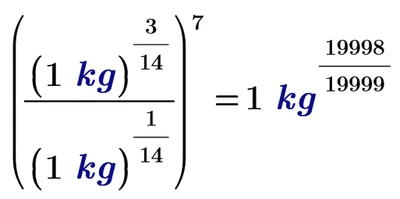
I tracked down the issue to a simple example (you must not use kg, use any unit):
Werner_E_0-1698835200373.png

Obviously the result should be simply 1 kg.

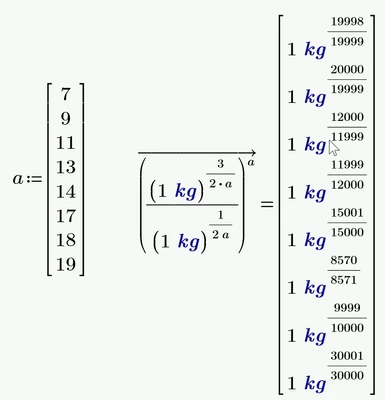
Here some examples using others numbers:
Werner_E_1-1698835294303.png


Like Martin I see no other workaround for you but doing the calculation unitless and add the correct unit manually
Werner_E_2-1698835579910.png

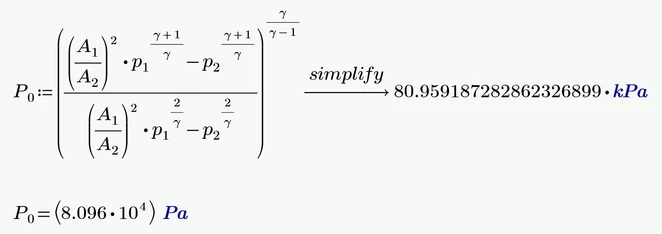
An easier workaround was shown by ttokoro, but because it uses symbolic evaluation its not available to you as you are using the free Express version of Prime
Werner_E_3-1698835681357.png

(It would also be necessary to enable units in symbolics in the calculation option to make this work)



4 replies

ttokoro
21-Topaz I
21-Topaz I
November 1, 2023

image.pngimage.png

This show the unit is kPa.

t.t.
24-Ruby III
November 1, 2023

Hi,

I guess the problem is caused by numerical inaccuracies when exponentiating the value in kPa by non-integer value. Unfortunately I do not know how to resolve the problem. Of course, you can divide values by units to get scalar values -OR- remove kPa units from variables.


Werner_E25-Diamond IAnswer
25-Diamond I
November 1, 2023

You found a severe bug in Prime.

Somebody should report it to PTC support.

As you are using the free Express, you probably are not eligible to to so. PTC seems not to be interested in bug reports by non-paying users (which implies that improving the quality of Prime seems not be of high priority to them).


I tracked down the issue to a simple example (you must not use kg, use any unit):

Werner_E_0-1698835200373.png

Obviously the result should be simply 1 kg.

Here some examples using others numbers:

Werner_E_1-1698835294303.png


Like Martin I see no other workaround for you but doing the calculation unitless and add the correct unit manually

Werner_E_2-1698835579910.png

An easier workaround was shown by ttokoro, but because it uses symbolic evaluation its not available to you as you are using the free Express version of Prime

Werner_E_3-1698835681357.png

(It would also be necessary to enable units in symbolics in the calculation option to make this work)


25-Diamond I
November 1, 2023

Applying my simplified example to real Mathcad (version 15) shows that the problem seems to be quite old.

The error message shows a strange limitation which obviously was incorporated into Prime, but without throwing an error if violated:

Werner_E_0-1698836859860.png


23-Emerald IV
November 1, 2023

Quite old, yes, but not extremely old:

LucMeekes_2-1698843569324.png

Luc

23-Emerald IV
November 1, 2023

It's a bug. It should go like this:

LucMeekes_1-1698843489535.png


Success!
Luc