1-Visitor
Apr 12, 2023 9:29 AM UTC
Solved

Units are not compatible

Hi!


I have a very bizarre error that I just can't solve.


See the following:

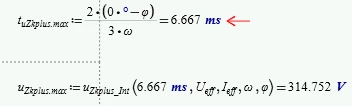
MK_9124307_0-1681291661517.png

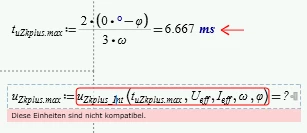
This gives me the "units are not compatible error" if I use t_uZkplus.max.


If I put the solution for t_uZkplus.max manually in the lower line it works just fine:

MK_9124307_1-1681291735262.png

I really don't understand what is going on here. Does anybody have an idea?

Werner_E
Werner_EAnswer
25-Diamond I
Apr 12, 2023 1:27 PM UTC

Looks indeed strange, but as Fed already wrote, without seeing the sheet itself we can only stab in the dark.

So if possible you should attach the worksheet or a simplified, down-stripped version of it showing the same behaviour.


You may use the error tracing - maybe knowing the line in the function u.Zkplus_Int( ) which throws the error can help in finding out what happens.

Werner_E_0-1681306041504.png


A significant difference between real Mathcad, where your original file stems from, and Prime is, that Prime is not using SUC (static unit checking. This means the something like 0 + 12 V = 12 V, which works OK in Mathcad, may (must not!) fail in Prime because Prime often needs a unit even if the value is zero.
The converter is not fixing situations like that and it can be quite hard to find these stumbling blocks in a converted sheet.

It doesn't look to me that this could be the cause in your case, but can't say for sure without seeing the sheet.

5 replies

23-Emerald I
Apr 12, 2023 11:00 AM UTC

Without the sheet to investigate, we can only guess.


I suspect you have run afoul of the dreaded label issue.  Prime may not always recognize what each .variable unit is.  Check 

Fred_Kohlhepp_0-1681297218872.png


Translate
1-Visitor
Apr 12, 2023 11:07 AM UTC

Unfortunately it is already labeled as a variable.


What is even more weird is the fact that it depends on the value of t_uzkplus.max.


As in the opening post it doesn't work if the result is 6.667 ms (well it works with 6.667 ms if I manually copy the result into the function):

MK_9124307_0-1681297523311.png


But it does with a different value:

MK_9124307_1-1681297571784.png


EDIT: I don't know if it's important but that sheet was converted from an older version of Mathcad where everything worked fine...


Translate
Werner_E
Werner_E25-Diamond IAnswer
25-Diamond I
Apr 12, 2023 1:27 PM UTC

Looks indeed strange, but as Fed already wrote, without seeing the sheet itself we can only stab in the dark.

So if possible you should attach the worksheet or a simplified, down-stripped version of it showing the same behaviour.


You may use the error tracing - maybe knowing the line in the function u.Zkplus_Int( ) which throws the error can help in finding out what happens.

Werner_E_0-1681306041504.png


A significant difference between real Mathcad, where your original file stems from, and Prime is, that Prime is not using SUC (static unit checking. This means the something like 0 + 12 V = 12 V, which works OK in Mathcad, may (must not!) fail in Prime because Prime often needs a unit even if the value is zero.
The converter is not fixing situations like that and it can be quite hard to find these stumbling blocks in a converted sheet.

It doesn't look to me that this could be the cause in your case, but can't say for sure without seeing the sheet.
Translate