12-Amethyst
April 21, 2023
Solved

Units in Combo Box - dimensionless elements get units

  • April 21, 2023
  • 2 replies
  • 2365 views

Hi all

Has anyone encountered this before?


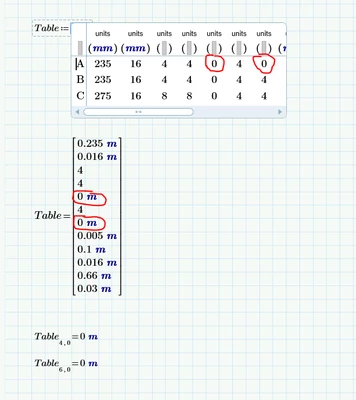
In my Combobox, dimensionless inputs get units. You see the problem below. I'm thankful for any advise how to get rid of the problem 🙂
 

ksk_10594232_1-1682056030591.png


Best answer by terryhendicott

Hi,

What you have found is a bug in Prime.  It is reproducable.


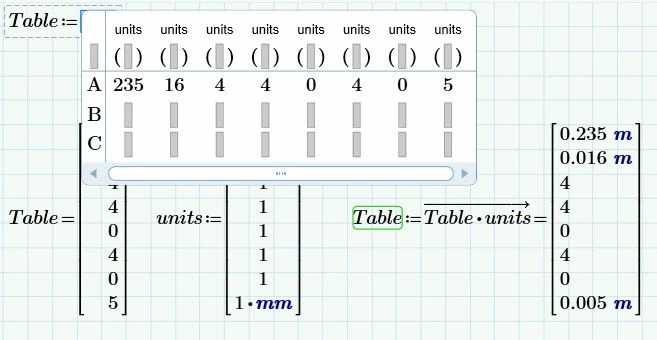
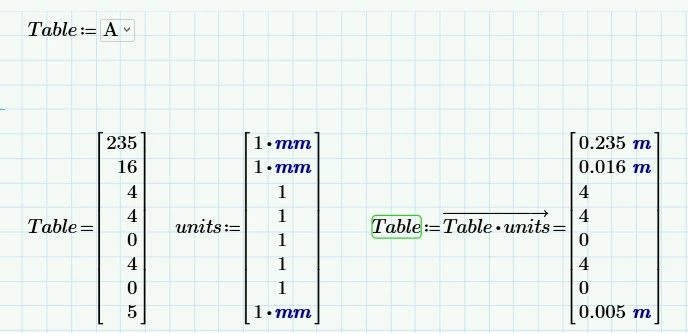
Workaround is like this:  Don't define units in the combo box but in a vector that can be applied.

Capture.JPG

Capture2.JPG

Cheers

Terry

2 replies

21-Topaz II
April 21, 2023

Hi,

What you have found is a bug in Prime.  It is reproducable.


Workaround is like this:  Don't define units in the combo box but in a vector that can be applied.

Capture.JPG

Capture2.JPG

Cheers

Terry

12-Amethyst
April 21, 2023

Thank you so much! 🙂

12-Amethyst
April 21, 2023

Solved in Prime 9 - no problem for me.


kudos

Owe

25-Diamond I
April 21, 2023

A more convenient workaround for this bug is IMHO to just use a pseudo unit like "rad" (which actually equals to 1) in the unit placeholder for the unit-less quantities.

If you don't like to see "rad" written when you edit the combo box (you would only see it there), you may also define a custom unit "unitless:=1" in front and use this instead of "rad".

Werner_E_0-1682074834461.png


BTW, other bugs in the combo box (apart from its inability to use combined units like m/s or N*m) are, that we are not allowed to insert the units via the unit drop down menu and that inserting Greek characters does not work using Ctrl-g.

So it gets quite cumbersome to insert units like Δ°C or kΩ. It can be done using copy and paste, though and given the implementation quality of the rest of the combo boxes I actually was surprised that units like °C (which are not simple factors but functions) actually seem to work correct once you succeed inserting them into the place holders.


25-Diamond I
April 21, 2023

OK, don't let us make it more complicated than it actually is 😉

No need to use "rad" or a custom unit. A simple "1" in the unit place holder (it gets labelled as unit automatically) is all that's needed to force even zero values to be unit less

Werner_E_0-1682076759614.png


12-Amethyst
April 21, 2023

Thanks for all great replies! 😀