I would like to use the result of a quadratic function for another mathematical operation. Example: F(x)=4x^2+x-3 gives the results -1.0 and 0.75. I would like to use the value 0.75 for another operation. Please give me some tips on how to write this in Mathcad.
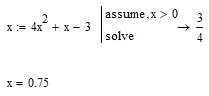
In case you are interested in the positive solution only you could use the “assume, x>0” modifier and assign the result a variable (and you may use “x” as variable name or anything else):
But you don’t need to use Primes symbolics. Alternatively you may use the “root” function or a solve block with “find”.
You may use the root function by providing a meaningful interval for the solution
or by providing a guess value (a negative guess will give you the result -1)
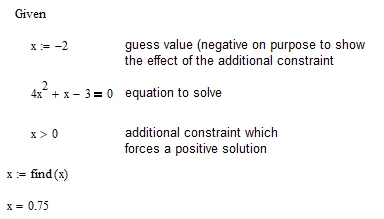
You cannot add an additional constraint if you use the “root” function, but you can if you use a solve block:
Note that this examples were done in legacy Mathcad 15 and a solve block looks quite different in Prime (“Given” is not needed and you have to insert the solve block like a separate component (Menu: Math - Solve block, or Ctrl+7)
In case you are interested in the positive solution only you could use the “assume, x>0” modifier and assign the result a variable (and you may use “x” as variable name or anything else):
But you don’t need to use Primes symbolics. Alternatively you may use the “root” function or a solve block with “find”.
You may use the root function by providing a meaningful interval for the solution
or by providing a guess value (a negative guess will give you the result -1)
You cannot add an additional constraint if you use the “root” function, but you can if you use a solve block:
Note that this examples were done in legacy Mathcad 15 and a solve block looks quite different in Prime (“Given” is not needed and you have to insert the solve block like a separate component (Menu: Math - Solve block, or Ctrl+7)