4-Participant
February 5, 2025
Solved

Using If statment function and variable

  • February 5, 2025
  • 2 replies
  • 1736 views

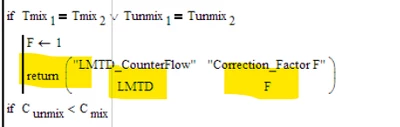
I'm trying to write a program in Mathcad, but stuck on this step highlighted below.

How to insert the second line in the bracket as show below for return function, thanks
DJ_12857440_0-1738714086202.png


Best answer by terryhendicott

Hi,

Need to create a matrix in the return brackets to return a matrix of four results  This works for Mathcad and Prime

Capture.JPG

Cheers

Terry

2 replies

21-Topaz II
February 5, 2025

Hi,

Need to create a matrix in the return brackets to return a matrix of four results  This works for Mathcad and Prime

Capture.JPG

Cheers

Terry

25-Diamond I
February 5, 2025

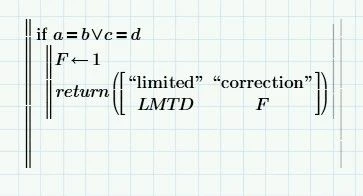
The expression after "return" is a 2x2 matrix.


I guess that you are trying to duplicate in Prime what was originally done in real Mathcad (legacy Mathcad, version 15 or below).

In Mathcad 15 (and below) a matrix is displayed in round parenthesis rather than in square brackets as in Prime.


Terry showed how it looks in Prime - the parenthesis around the matrix aren't necessary but don't do any harm either.

EDIT: I just noticed that Terry did not use the programmed "return" statement but rather typed "return" and so his "return" is interpreted as variable or function name (you can tell that because its set in italic typeface). So that's why he needed the function parameter parentheses to be able to follow with the matrix.


But what the Mathcad 15 snippet actually shows is rather most likely a return-statement, not a function, as you had mistakenly written!
If it would be a function, we should see double parenthesis in the Mathcad code snippet, one pair as parameter parentheses and the other to indicate the matrix.


So either use the "return" statement from the menu

Werner_E_0-1738720658371.png

or press the keyboard shortcut or you simply type "return" (without the quotes) and follow immediately by pressing Ctrl-J which turns the text into the appropriate program statement.
Ctrl-J is a very valuable and convenient improvement in Prime (especially as Prime lacks the floating palettes of Mathcad).

So the code snippet should look like this in Prime

Werner_E_1-1738721064575.png

Note that "return" statement is set in upright typeface (similar to the "if" statement), not in italic like variable or function names.
Guess you know how to create a matrix (keyboard short Ctrl-M, add columns or rows via Shift-Space or Shift-Enter).


BTW, it would not be necessary to assign F the value 1 and then use it in the matrix. You could as well omit the assignment F <-- 1 and simply type "1" instead of "F" in the matrix. After all the program is terminated by the "return" statement.


4-Participant
February 5, 2025

Completed the problem, but having issues with execution of the solution. This problem is to find the area of a cross-flow heat exchange

It's showing I've not assigned LMTD, but it's not correct.

Please review and comment where I'm going wrong.

21-Topaz II
February 5, 2025

Hi,

Value of Cunmix is not defined?  Made a guess?

Removed brackets from around matrix in first return statement.

In equations for NTUCross Flow in both if statements corrected a c that should be C?

Changed all instances of LMTDcorrected to LMTDCorrected with a capitol C

Note case of Cmix = Cunmix is not covered?


Cheers

Terry