
1-Visitor
May 3, 2016
Question

Using Range Variables to Create a Matrix?

  • May 3, 2016
  • 6 replies
  • 14552 views

I'm trying to define a variable (shown as 'n' below) that will create a matrix of 'n' columns and subsequently use the values in the matrix to perform arithmetic operations:
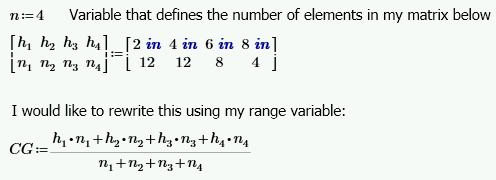
Question.PNG

Thanks,

Kevin

6 replies

1-Visitor
May 3, 2016

I don't think it's possible to do exactly what you want in Prime.  There is a solution in Mathcad 15 (& prior) using scripted components.

Here's my stab at a best solution for you in Prime:

25-Diamond I
May 3, 2016

> I'm trying to define a variable (shown as 'n' below) that will create a matrix of 'n' columns

This sure should be no problem

> and subsequently use the values in the matrix

You will have to tell us, how those values depend on n

It looks like h_i=i*2 in, right? But what about the values of n_i ?

> to perform arithmetic operations:

Again - should be no problem.

So all what remains is that you specify the values of your matrix.

R

23-Emerald I
May 4, 2016

It's not clear to me why you're working so hard!  define a vector of lengths and a correlating vector of numbers.  (You had to type those in, right?)  Then vector math is simple:

23-Emerald V
May 4, 2016

Just a variant on the already proferred suggestions ...

Stuart

kwadley1-VisitorAuthor
1-Visitor
May 4, 2016

Thanks all for the replies!

Looks like I need to give a little background:


I am trying to create a BLANK matrix of elements based on the number of rows of items I have, but the number of rows is not a constant from one design to the next.  To clarify, the values of 'n' & 'h' are totally independent and do NOT depend on the number of rows, i.e., my range variable.

where      n = number of items/row (or total area if each has an area of 1)

                h = height of row from a horizontal reference


So, my worksheet is calculating the center of gravity of my items which all have the same area.


23-Emerald IV
May 4, 2016

With BLANK matrix, do you mean an empty matrix?

Then look here Variable sized vectors and matricies where the components can be edited by the user.

Or do you mean to create a matrix filled with 0's. like:

Success!
Luc

kwadley1-VisitorAuthor
1-Visitor
May 5, 2016

Mark & Luc-

The link you provided IS the solution I'm looking for.  However, as Mark pointed out, I AM using Mathcad Prime.  Can I do this in Prime?

FYI, I'm still a novice user.  I'm learning more everyday, but I am not really sure how to follow the example.  Where is the code for the 'Define Matrix' button, and is this written in Mathcad?  If I right click on the button and select 'Edit Script', a text editor pops up?  Also, does the hidden area entitled 'Utilities' above this button have anything to do with the matrix generator?

Kevin

23-Emerald V
May 5, 2016

Kevin Wadley wrote:

Mark & Luc-

The link you provided IS the solution I'm looking for.  However, as Mark pointed out, I AM using Mathcad Prime.  Can I do this in Prime?

No.  Not until (at least) version Prime 4.0.  Prime 3.1 lacks components.

The link you provided IS the solution I'm looking for.  However, as Mark pointed out, I AM using Mathcad Prime.  Can I do this in Prime?

Where is the code for the 'Define Matrix' button, and is this written in Mathcad?  If I right click on the button and select 'Edit Script', a text editor pops up? 

When you click "Edit Script", you are presented with the code for the Define Matrix button.  It is written in VBScript.

Also, does the hidden area entitled 'Utilities' above this button have anything to do with the matrix generator?

No.

Getting back to your original problem, why do you need to create the matrix?

Stuart

19-Tanzanite
May 5, 2016
No.  Not until (at least) version Prime 4.0.  Prime 3.1 lacks components.

IIRC Prime 4.0 will not have components either. So that is at least a year and a half away.
