
1-Visitor
September 8, 2016
Question

"Value cannot be null. Parameter name: pUnk"

  • September 8, 2016
  • 2 replies
  • 5243 views

Hello,

Please see screenshot below and help me get the items in the Component Wizard to show up again.

Thanks

Joe
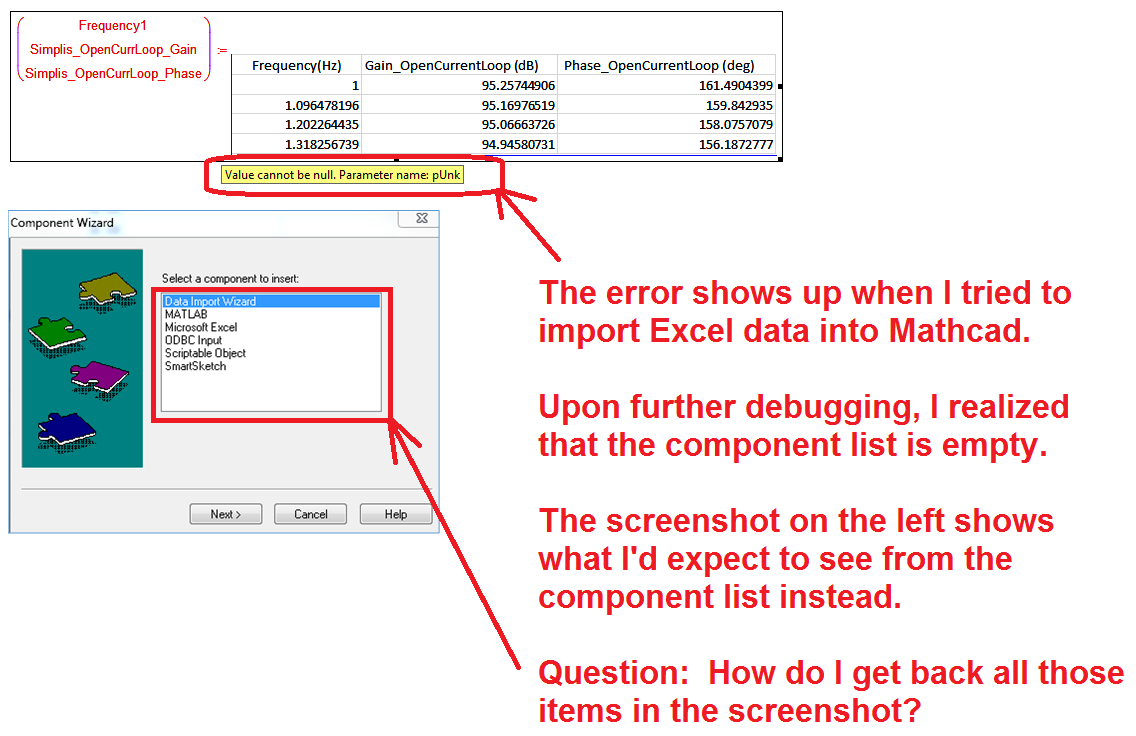
1.png

2 replies

23-Emerald I
September 8, 2016

I a bit confused.  Your screen shot looks like you've got an EXCEL sheet imbedded; I get the component wizard window if I'm inserting a new component.

If you have the this


in a sheet already try this:

  • right-click on the component.  You should get a dialog with

                                 "add input variable"

                                 "add output variable"

                                 "properties"

   and a bunch of other options

This should let you define your inputs

24-Ruby III
September 9, 2016

But where is your Mathcad worksheet with this error?

jc-41-VisitorAuthor
1-Visitor
September 9, 2016

1.png@

jc-41-VisitorAuthor
1-Visitor
September 9, 2016

Hi,

This is the mathcad program that shows the error.

Please advise what to do about it.

Joe
