8-Gravel
May 26, 2025
Solved

Variable Setting
  • May 26, 2025
  • 3 replies
  • 2250 views

DDHH2001_0-1748253040334.png

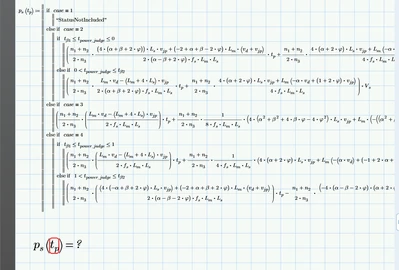
I tried to output the calculation result. The ideal result would be like: "ps = k tp + b "according to the "IF processing". The "tp" here actually relates to the time, but right now I just want the result to be like the form I mentioned above. In other word, I think and hope the "tp" is just a symbol in my ideal output result.

So I tried to set it as a  "key word" or "constant" by setting the labels but found nothing helpful. Can any solution help me with this? Many thanks advanced !

Files attached.

Best answer by Werner_E

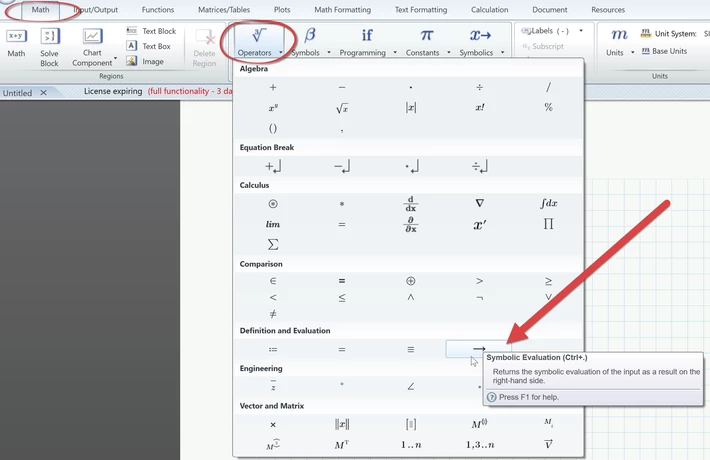
If you expect a symbolic result (as tp is an undefined variable) you have to use symbolic evaluation and not numeric (the normal equal sign).

Werner_E_0-1748263057220.png

Is it this you are looking for?  No need the re-label tp as Keyword or anything else.

Number of decimals is per default 20, You can limit this number using the "float" keyword. But keep in mind that doing so also affect the precision of the calculation, not just the display of the result.


Symbolic evaluation:

Werner_E_1-1748263261630.png


3 replies

24-Ruby III
May 26, 2025

MartinHanak_0-1748255582980.png


DDHH20018-GravelAuthor
8-Gravel
May 26, 2025

Hi !

I mean, this is where the  problem occurs. I try to set the "tp" as  symbol, but it keeps telling me that the "tp" is undefined and to recheck the lable that I set.

I change the definition btw, two variables are needed in this function I defined actually.

DDHH2001_0-1748259285828.png


DDHH20018-GravelAuthor
8-Gravel
May 26, 2025

I do a little modification. Instead of outputting the ideal equation form that I need, I try to calculate the coefficients "k" and "b". But there is a new problem occurs indicated that "This value must be a function".😥

Werner_E25-Diamond IAnswer
25-Diamond I
May 26, 2025

If you expect a symbolic result (as tp is an undefined variable) you have to use symbolic evaluation and not numeric (the normal equal sign).

Werner_E_0-1748263057220.png

Is it this you are looking for?  No need the re-label tp as Keyword or anything else.

Number of decimals is per default 20, You can limit this number using the "float" keyword. But keep in mind that doing so also affect the precision of the calculation, not just the display of the result.


Symbolic evaluation:

Werner_E_1-1748263261630.png


DDHH20018-GravelAuthor
8-Gravel
May 26, 2025

THANKS! It does work!