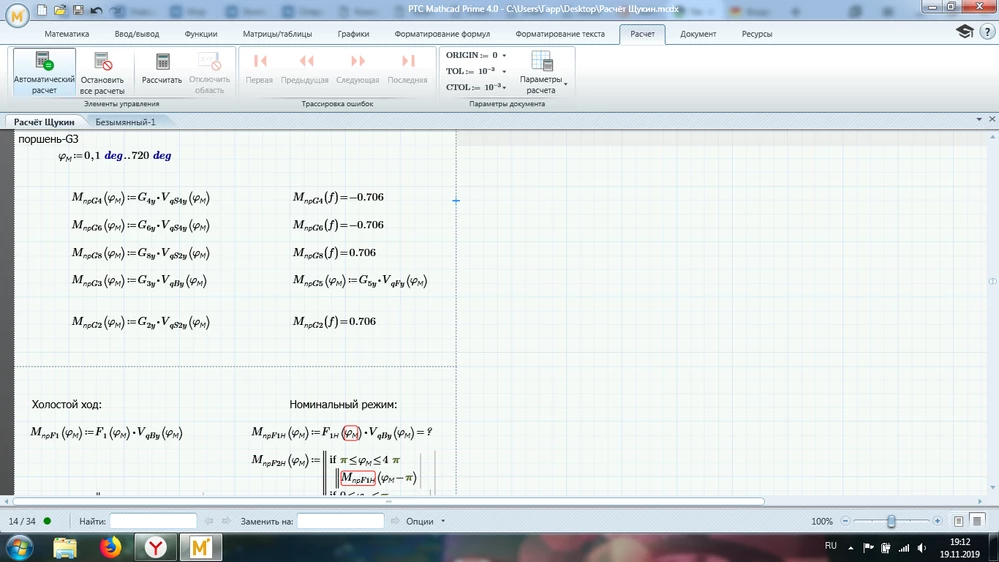
The very sheet you finally attached sure did never run OK on any computer with any version of Prime.
Either it did not run for your buddy, too, or it was modified.
Luc is right that the labelling is not the cause for your issues, but the errors you experience do not stem from the problems in the function definitions, which Luc is mentioning, either. 😉
Nevertheless you should define your functions more clearly, though. The way you (or your buddy) did it is kind of sloppy as two conditions are true if the angle is exactly pi, 2pi or 3pi. But this is no problem for Prime - the second condition wins. There is no error thrown because of this. Its also sloppy that you did not define a return value for angles larger than 4 pi as Luc also had noticed. But this, too does not throw an error, because, as far as I see, you never feed your functions with angles larger than 720 degree.
Nonetheless you should correct your functions the way Luc has suggested.
The real cause for the errors your sheet is throwing are:
1) Two times you follow a function definition with an equal sign (numerical evaluation). Luc was the first to point this out to you in his first reply and I had additionally attached a picture to make it clearer.
2) Later you use functions M.npF3H and M.npF4H but these function are not defined anywhere in your sheet.
Instead we just see the definitions of M.npF1H and M.npF2H .
3) Later you use a variable N which is never defined (4 pi /N and a range i:=0,1..N). N is interpreted as the unit Newton by Prime and thats the reason for the unit mismatch error in the range definition
I gave it a try and corrected all those errors and your worksheet performs well.
I used already defined functions for the missing ones, which is sure not what you had in mind and used N:=12.
I also deleted the regions which write Excel-files as I don't like worksheets which create files on my computer without any warning. You should disable that kind of commands when you post worksheets.
I attach the modified sheet in version P5
I stopped the calculation for the last three plots as I did not want to wait for these time consuming calculations to finish. Thats the reason you still see red errors there but hey should go away if you recalculate the sheet.
You have still to provide the correct missing functions and the correct value for N!