

1-Visitor
September 22, 2016
Solved

Vector error with counter

  • September 22, 2016
  • 3 replies
  • 3924 views

The attached Mathcad prime 3.1 file and jpg is attempting to make a vector using a counter but I get the error as shown. Why does Prime not let me make the results a vector? My ultimate goal is to find local and global max/min of the resulting vector.

Also, is there a way to display the vectors horizontally? The transpose command doesn't appear to work on i.
Best answer by MJG

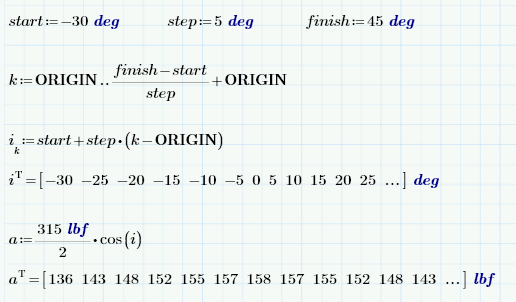
Your definition of i is a range variable, not a vector.  That's why you don't get your desired results, and also why you cannot transpose i.

You need to define i as a vector.  Here is one approach:

3 replies

24-Ruby III
September 22, 2016

Just type a(i):=...

dsochor1-VisitorAuthor
1-Visitor
September 22, 2016

Thank you Vladimir!

24-Ruby III
September 23, 2016

You're welcome. The only thing that I didn't pay attention that you want to work with a vector further.

MJG1-VisitorAnswer
1-Visitor
September 22, 2016

Your definition of i is a range variable, not a vector.  That's why you don't get your desired results, and also why you cannot transpose i.

You need to define i as a vector.  Here is one approach:

dsochor1-VisitorAuthor
1-Visitor
September 22, 2016

Thanks Mark, is there a way to combine i and a into a single matrix (with different units) so that angle and weight can be displayed side-by-side?

1-Visitor
September 22, 2016

"augment" puts columns side-by-side:

similarly, "stack" puts rows one on top of the other

Unfortunately, I don't think you can control the units it displays in a mixed-unit matrix.

Edit: You're probably aware that you can change the worksheet's "unit system" and that will obviously change the force units displayed (to lbf for USCS), but I mean that you cannot manually change the display of a mixed-unit matrix to show other units (such as degrees for your angle or kip force).

1-Visitor
September 22, 2016

Does anyone know why the calculation in the bottom-left of OP's worksheet DOES work?  I would have expected the same error.

25-Diamond I
September 22, 2016

You can evaluate a function with a range as argument, but you can't assign the result to a variable. The result is not a range, not  a vector, its just some kind list. Obviously a dat type not designed to be stored in a variable.