3-Newcomer
September 23, 2024
Solved

Vector or matrix from a for loop

  • September 23, 2024
  • 1 reply
  • 1302 views

Hello,

I have separated a small for-loop from my calculation. This also works correctly.
Now I would like to save ai for each i or rather access individual values. Furthermore, I would like to draw a graph. y-->ai and x-->i
I would be grateful for any help 🙂
Kind regards
Max

Best answer by StuartBruff

@MS_12003747 wrote:

Hello,

I have separated a small for-loop from my calculation. This also works correctly.
Now I would like to save ai for each i or rather access individual values. Furthermore, I would like to draw a graph. y-->ai and x-->i


Hi, Max.


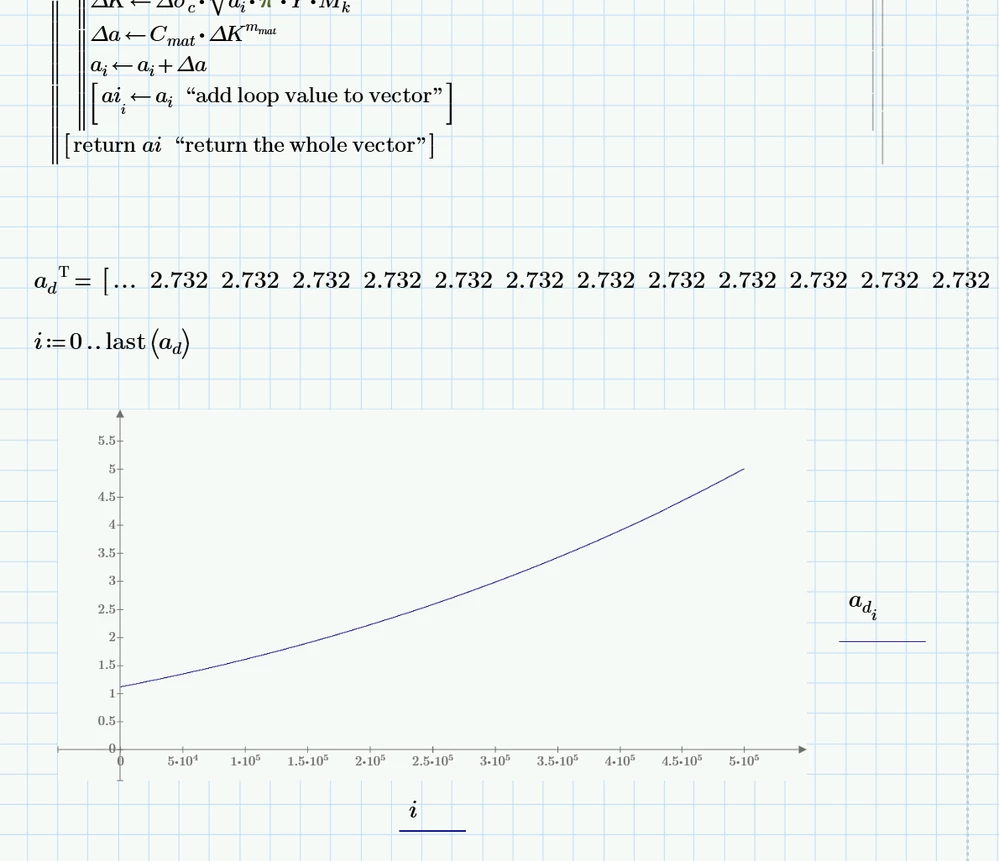
A solution to the requirement is to add each ai value to a vector in the loop and then return the whole vector. I've added 'comments' to each line that I've modified - note that the return in the last line is necessary, otherwise, Mathcad returns the vector and the comment.

Then simply create a range variable to match the new vector and plot the result.
 

2024 09 23 G.png


Stuart


Edited to add:


I've had an unreliable internet service today and couldn't upload your (modified) worksheet.  However, as the output of the calculation looks almost linear, I guessed that increasing the ai interval by 100 or so, shouldn't have too much effect on the results; it doesn't appear to, only differing by 0.01 from the original value.


This allowed me to reduce the size of the worksheet from almost 5 MiB to 294 KiB, which should be (and was) sufficiently short to reliabily upload.

 

1 reply

23-Emerald V
September 23, 2024

@MS_12003747 wrote:

Hello,

I have separated a small for-loop from my calculation. This also works correctly.
Now I would like to save ai for each i or rather access individual values. Furthermore, I would like to draw a graph. y-->ai and x-->i


Hi, Max.


A solution to the requirement is to add each ai value to a vector in the loop and then return the whole vector. I've added 'comments' to each line that I've modified - note that the return in the last line is necessary, otherwise, Mathcad returns the vector and the comment.

Then simply create a range variable to match the new vector and plot the result.


2024 09 23 G.png


Stuart


Edited to add:


I've had an unreliable internet service today and couldn't upload your (modified) worksheet.  However, as the output of the calculation looks almost linear, I guessed that increasing the ai interval by 100 or so, shouldn't have too much effect on the results; it doesn't appear to, only differing by 0.01 from the original value.


This allowed me to reduce the size of the worksheet from almost 5 MiB to 294 KiB, which should be (and was) sufficiently short to reliabily upload.


3-Newcomer
September 24, 2024

Really, thank you very much! I now understand the procedure! This helps me a lot!

23-Emerald V
September 24, 2024

Kein Problem, Max.


Stuart