14-Alexandrite
November 18, 2024
Solved

vectorization - I need to change an array into vector in Prime 10

  • November 18, 2024
  • 1 reply
  • 1525 views

Hi everyone,

I need to change an array into vector in Prime 10 .  

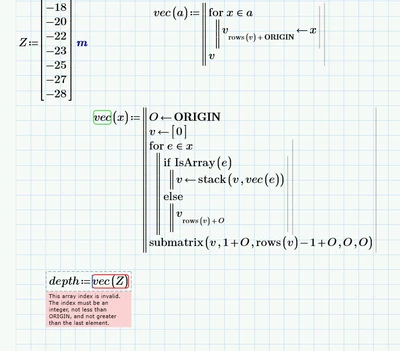
@StuartBruff ..Stuart you have previously suggested this method , but I don't know where I have a mistake 
 
.
YA_10963798_1-1731927867903.png

Can you show me how to solve this? Prime 10 is attached 


Thanks in advance 
 
 
Best answer by Werner_E

Terry already pointed you to the missing assignment.

But the first, simpler version of "vec" you show in your picture should work equally well!

Stuarts version has the benefit that it also unravels recursively nested vectors. But thats not necessary when you just want to turn a range into a vector. You also should not keep both versions of "vec" with the same name in your sheet. The call of "vec" in the "stack" function of the second "vec" variant would call the first variant and not itself as it should be. Thats the reason I renamed Stuarts function to "vec2" in the picture below which is just here to demonstrate what Stuarts function is capable of:
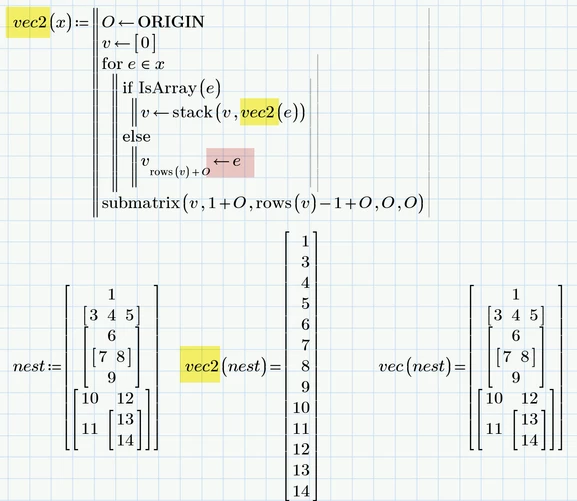
Werner_E_0-1731943098377.png

The simple "vec" is only good for turning a range into a vector.

Stuarts extended version will also deal with nested matrices.

It will not deal with matrices containing ranges, though 😉 😈
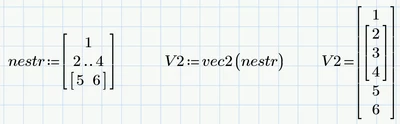
Werner_E_1-1731942616602.png

Dealing with this moloch, too, would make it necessary to add Stuarts "IsRange" function alongside the "IsArray".

 

1 reply

21-Topaz II
November 18, 2024

Z is already a vector not a range. 

Capture.JPG

Cheers

Terry

14-Alexandrite
November 18, 2024

Hi Terry,

Thank you for replying .. actually this is the original sheet 

YA_10963798_0-1731929809025.png

and it tells me I need to have ztips as vector 

YA_10963798_1-1731929844428.png

the above sheet was a simplified sheet to explain what I need to do ..

21-Topaz II
November 18, 2024

Capture.JPG