1-Visitor
June 7, 2024
Solved

Vectorization not working

  • June 7, 2024
  • 2 replies
  • 1700 views

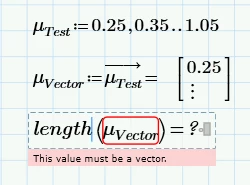
Hi everyone. I'm using Mathcad Prime 10.0. Was using 8.0 before the update. I tend to use vectorization this way before and never had a problem. Since I switched to 10.0 this way doesn't work anymore. It should be a vector or matrix but none of the operation for matrix or vector work anymore.  Let me know if there is any error on my side, Thanks for your help!


HH_11117807_0-1717770852363.png

Best answer by Werner_E

The undocumented trick to turn a range into a vector never needed the usage of the vectorization operator!

As @DJNewman  already wrote this undocumented feature was removed with version 10 of Prime, unfortunately without providing a "legal" alternative.


So by now you either have to use your own user defined function to create the necessary vector right ahead, or you use a function which turns an existing range into a vector. You can find some suggestions in the thread @DJNewman  linked to.

For example:
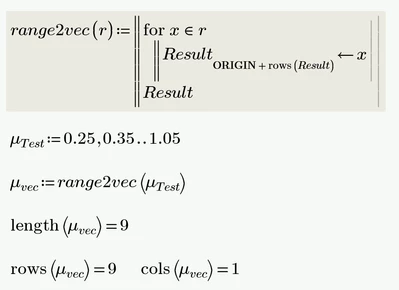
Werner_E_0-1717779423288.png


You could use this very same function also to create the vector right ahead using a local assignment
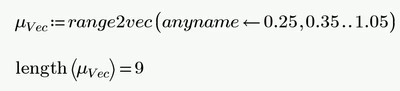
Werner_E_1-1717779753314.png

but you can't type it in that way because Prime won't allow you to provide the second, comma separated value of the range (0.35). You would have to type it in an empty place on the sheet and then use copy and paste. Awkward, so you may be better off with one of the other functions if you want to create a vector without the detour via a range variable.

 

2 replies

DJNewman
18-Opal
June 7, 2024

Mathcad Prime 10 removed the "undocumented trick" of turning range variables into vectors by in-line evaluating them from the definition.

This thread has some alternative workarounds to easily create vectors with a step function.

PTC Marketer for Creo and Mathcad. I run their YouTube channels, some Creo campaigns, and all Mathcad campaigns and communications.
Werner_E25-Diamond IAnswer
25-Diamond I
June 7, 2024

The undocumented trick to turn a range into a vector never needed the usage of the vectorization operator!

As @DJNewman  already wrote this undocumented feature was removed with version 10 of Prime, unfortunately without providing a "legal" alternative.


So by now you either have to use your own user defined function to create the necessary vector right ahead, or you use a function which turns an existing range into a vector. You can find some suggestions in the thread @DJNewman  linked to.

For example:

Werner_E_0-1717779423288.png


You could use this very same function also to create the vector right ahead using a local assignment

Werner_E_1-1717779753314.png

but you can't type it in that way because Prime won't allow you to provide the second, comma separated value of the range (0.35). You would have to type it in an empty place on the sheet and then use copy and paste. Awkward, so you may be better off with one of the other functions if you want to create a vector without the detour via a range variable.
 

1-Visitor
June 18, 2024

Appreciate your response as well as alternative for this. It should work just fine. Just a few lines more. Thanks for your help!
