

1-Visitor
October 19, 2016
Solved

Why cant i arrange the numbers in a component-excel table?

  • October 19, 2016
  • 18 replies
  • 5442 views

I am uploading an example where i created an excel table with component and added 3 vectors as input. If i arrange the number it works fine but when i press the mouse somewhere else to go out of the excel format it mixes again the numbers

Best answer by AlvaroDíaz

Hi.

You can't use tables nor ranges for sort the inputs values, but can use some combination of excel functions for sort, but in other place, not where excel get's mathcad values.

Best regards.

Alvaro.
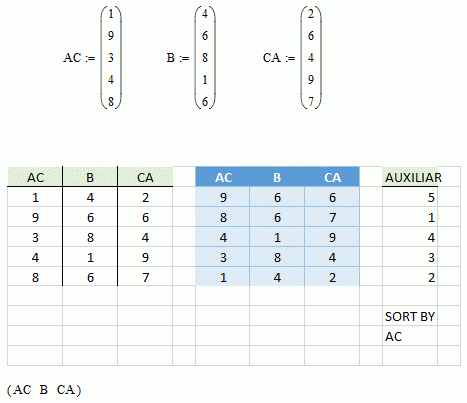
fig.gif

18 replies

25-Diamond I
October 19, 2016

If i arrange the number it works fine

?? What do you mean by "arranging the number" and what is it which works fine?

when i press the mouse somewhere else to go out of the excel format it mixes again the numbers

Sorry, but its absolutely not clear to me what you mean by that and what problem you experience.

In case thats irritating you: You can't change the cells which are assigned by the three input vectors as the excel table will always be assigned their values upon recalculation.

1-Visitor
October 20, 2016

I have uploaded the file. You can see an arrow in the begining of each line. If i sort the values on the table  from the smallest it changes all the places fine. But when i press out of the excel sheet(to go out of excel

editing.. Dont know how to call it) it brings back the numbers in the same order.

Sorry for the confusion. Hope it is better explained now.

24-Ruby IV
October 20, 2016

For what Excel? Sort them in Mathcad!

12-Amethyst
October 19, 2016

Hi.

You can't use tables nor ranges for sort the inputs values, but can use some combination of excel functions for sort, but in other place, not where excel get's mathcad values.

Best regards.

Alvaro.

fig.gif

1-Visitor
October 20, 2016

But in this case if you change matrix AC you need to change manually also "Auxiliary" numbers?