

1-Visitor
Oct 16, 2014 10:56 PM UTC
Solved

Why different solutions for same problem?

Guys, I have solved a simple equation in two different methods. Can you please tell what I am doing wrong in the 2nd method thast i am getting a different result?

Thank you

Werner_E
Werner_EAnswer
25-Diamond I
Oct 16, 2014 11:18 PM UTC

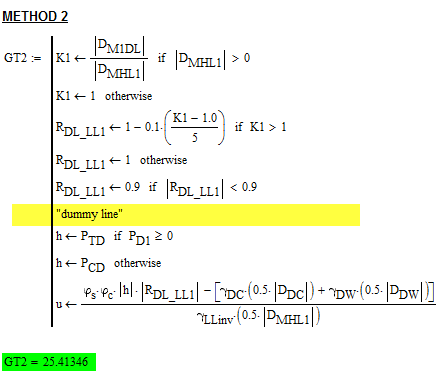
The reason is the way how multiple successive if-statements followed by an otherwise are evaluated. Otherwise only triggers if ALL if's had failed. So your variable h never gets a value and is zero - therefore the wrong result.

A workaround can be to separate the if's by a dummy line:
1.png

From Mathcad's help:

  • Each conditional evaluation is considered on its own. When Mathcad encounters several sequential if statements at the same level, it evaluates each if statement in turn, regardless of the results of the previous statement. If you wish to evaluate an expression based on whether a particular if statement evaluates as true or false, use the otherwise operator. otherwise operator
  • If you use more than one if statement before an otherwise statement, the otherwise statement is executed only when all previous conditions are false. However, all previous if statements continue to be evaluated regardless of the results of the previous if. In the example above fy(5) = 9 and fy(2) = 1. There is no "else if" or "case" statement in Mathcad that allows you to switch on multiple cases, other than to use nested if ... otherwise pairs.

2 replies

Werner_E
Werner_E25-Diamond IAnswer
25-Diamond I
Oct 16, 2014 11:18 PM UTC

The reason is the way how multiple successive if-statements followed by an otherwise are evaluated. Otherwise only triggers if ALL if's had failed. So your variable h never gets a value and is zero - therefore the wrong result.

A workaround can be to separate the if's by a dummy line:

1.png

From Mathcad's help:

  • Each conditional evaluation is considered on its own. When Mathcad encounters several sequential if statements at the same level, it evaluates each if statement in turn, regardless of the results of the previous statement. If you wish to evaluate an expression based on whether a particular if statement evaluates as true or false, use the otherwise operator. otherwise operator
  • If you use more than one if statement before an otherwise statement, the otherwise statement is executed only when all previous conditions are false. However, all previous if statements continue to be evaluated regardless of the results of the previous if. In the example above fy(5) = 9 and fy(2) = 1. There is no "else if" or "case" statement in Mathcad that allows you to switch on multiple cases, other than to use nested if ... otherwise pairs.
Translate
nbitla1-VisitorAuthor
1-Visitor
Oct 17, 2014 1:47 PM UTC

Thank you so much

-nb

Translate