1-Visitor
September 24, 2015
Question

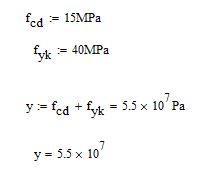
Why does mathcad forget units?
  • September 24, 2015
  • 7 replies
  • 2745 views

Unit problem.JPG

Hi!

I can't find the reason why mathcad leaves the unit in the last row "y=5.5x10^7".

7 replies

23-Emerald V
September 24, 2015

vlönnqvist wrote:

Hi!

I can't find the reason why mathcad leaves the unit in the last row "y=5.5x10^7".

What version of Mathcad are you using?  Can you post a worksheet showing your example? (It's often easier to find out what the problem is when looking at the worksheet rather than an image).

Here's what I get in M15 typing on a Blank worksheet.

Stuart

1-Visitor
September 24, 2015

Mathcad 15 M040 I have tried also with M030.

Seems its something with my computer only. Your file have the same problem too.

23-Emerald V
September 24, 2015

vlönnqvist wrote:

Mathcad 15 M040 I have tried also with M030.

Seems its something with my computer only. Your file have the same problem too.

It does indeed look like a problem with your computer.  This is what I get directly upon opening your file on my M15 040 ...

The only other I can think of (apart from a re-installation) is to check your Worksheet Options and Preferences (Tools menu) settings with regard to units.

Is this a general problem or is it specific to your variables  (eg, if you type z := 15 MPa + 40 MPa what does z= give you, or if you type a:=15 m  b:=40 m z:=a+b what does z= give?)?

Stuart

1-Visitor
September 24, 2015

It works when i define y(f.cd,f.yk) = f.cd+f.yk but not in that why it works for other.

23-Emerald I
September 24, 2015

There have been a few strange things when the in-line evaluation is used.  Try just defining the variable without the post definition evaluation and see if that fixes the second evaluation.