13-Aquamarine
July 27, 2016
Solved

Why has Mathcad 15 sometimes fitting problems

  • July 27, 2016
  • 10 replies
  • 3870 views

I use CurveExpert (version 2.4.0) for getting an initial idea on what is the best fitting model for a data set. However, when I want to use then the proposed equation in Mathcad I do not get optimal results. In the rational fit I am completely out of range while in the sinusoidal fit my R² is lower. I assume that I am not familiar enough with all fitting possibilities within Mathcad 15. So I would appreciate any help as I would like to improve my skills or to understand why the results in Mathcad are inferior to those of CurveExpert. I have added 2 worksheets to demonstrate the issue.

Best answer by Werner_E

You are not doing anything wrong. Curve fitting in Mathcad can be quite tricky and also disappointing. Most of the time when it fails the fit is very sensitive according to the guess value. CurveExpert Pro as a specialized program is far better in doing its task. Especially as it has the ability to chose guess values itself and also, as I suspect, changes those guesses in trying to find the best fit.

Mathcad works with the guesses you provide, runs down the error surface and stops, when it has found a relative minimum. Other guesser might yield a different, better relative min.

There is also nothing which could be said against using a solve block with minerr. Usually this method has advantages over genfit as you have more control, can add additional constraints, etc.

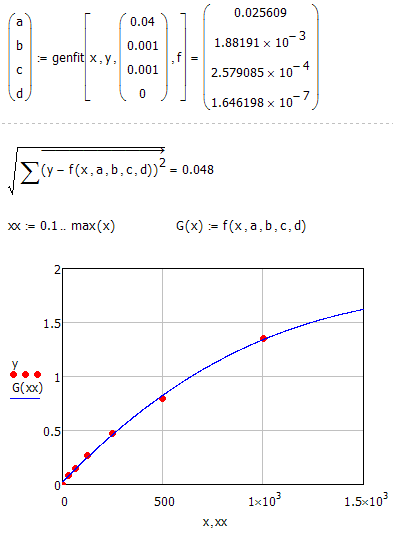
Vladimir suggested using the built-in genfit and actually it can provide a much better result than your solve block:

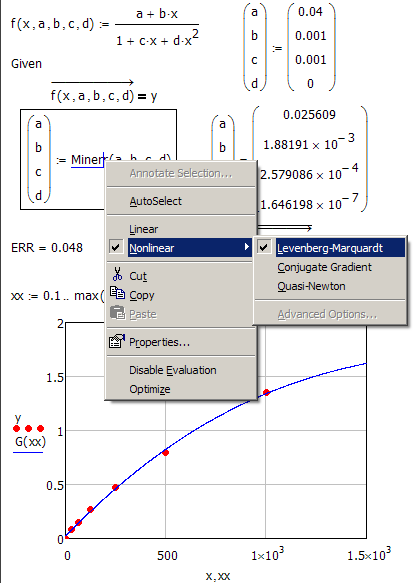
But you can achieve the very same result with your solve block if you change the algorithm to "Levenberg-Marquardt" which usually is a good choice anyway. Right click at the word "Minerr" to change the algorithm. You can also change the algorithm for genfit, but you can just chose between LM and optimized LM (which is default). Interestingly enough genfit fails in this example when LM is chosen.

Regards

Werner

10 replies

24-Ruby IV
July 27, 2016

Use "genfit" built-in function to determine parameters of the function. Has been shown before here: Re: Problem with 4 parameter logistic fit for immunoassay

Werner_E25-Diamond IAnswer
25-Diamond I
July 27, 2016

You are not doing anything wrong. Curve fitting in Mathcad can be quite tricky and also disappointing. Most of the time when it fails the fit is very sensitive according to the guess value. CurveExpert Pro as a specialized program is far better in doing its task. Especially as it has the ability to chose guess values itself and also, as I suspect, changes those guesses in trying to find the best fit.

Mathcad works with the guesses you provide, runs down the error surface and stops, when it has found a relative minimum. Other guesser might yield a different, better relative min.

There is also nothing which could be said against using a solve block with minerr. Usually this method has advantages over genfit as you have more control, can add additional constraints, etc.

Vladimir suggested using the built-in genfit and actually it can provide a much better result than your solve block:

But you can achieve the very same result with your solve block if you change the algorithm to "Levenberg-Marquardt" which usually is a good choice anyway. Right click at the word "Minerr" to change the algorithm. You can also change the algorithm for genfit, but you can just chose between LM and optimized LM (which is default). Interestingly enough genfit fails in this example when LM is chosen.

Regards

Werner

FDS13-AquamarineAuthor
13-Aquamarine
July 27, 2016

Werner and Vladimir thank you for this information. So I guess it is best to make CurveExpert do the first fit and then use his coefficients as guess values in Mathcad.

25-Diamond I
July 27, 2016

FDS wrote:

Werner and Vladimir thank you for this information. So I guess it is best to make CurveExpert do the first fit and then use his coefficients as guess values in Mathcad.

This sure is a good idea - especially if you have no clue which type of function to chose or in which area the guesses should be. But for many tasks you know exactly which kind of function you are hunting for and also have a rough idea concerning its parameters. So as you have seen genfit does a nice job and the solve block, too, if you chose the LM algorithm.

Nevertheless Curveexpert sure is easier to use, better suited and often gives you also better results.

Mathcad is an all-purpose program. It isn't really good at symbolics (Maple and Mathematica are far better), its not state of the art when it comes to curve fitting and its even not that good when it comes to numerical algorithms (compared to Matlab). But it can do it all, handles units like a charm and its white board interface is unrivaled.

WE