10-Marble
Jun 16, 2025 9:59 PM UTC
Solved

Why is my answer so weird?

Hello people 🤗 Mathcad 10 Prime User here,


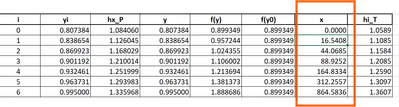
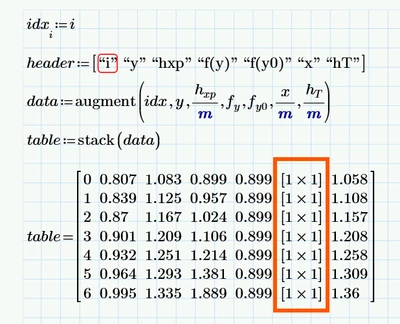
In my picture below you will see that the equation is giving me a very weird answer. I guess it has something to do with a vector problem, but I tried everything and can't figure out what the problem might be. And I also don't understand why my "header" is showing an error. The table from Excel should be my answer. Don't get confused by "yi"and "y" - it's the same thing, it can be ignored. I also send the mathcad pdf (i don't know why I can't send the actual file but anyways - it always said error) - all the equations are correctly written. 
SO_10687563_0-1750110534517.png

SO_10687563_1-1750110602448.png

Thanks for any help.


Saro

Werner_E
Werner_EAnswer
25-Diamond I
Jun 16, 2025 10:13 PM UTC

When you defined x]i you typed square brackets and doing so creates a matrix. That's the reason why you see "x" as a 1x1 matrix. Use normal parentheses and all should work as intended.

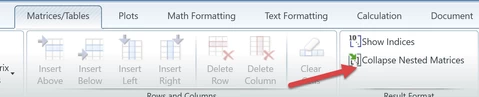
Of course you could uncheck "Collapse Nested Matrices" to see the values but I would strongly suggest to used just normal 'round' parentheses.

Werner_E_0-1750113211338.png


BTW, its way better to post the worksheet itself rather than just a pic or a pdf. That way we may also be able to spot the error in defining the variable "header".

6 replies

Werner_E
Werner_E25-Diamond IAnswer
25-Diamond I
Jun 16, 2025 10:13 PM UTC

When you defined x]i you typed square brackets and doing so creates a matrix. That's the reason why you see "x" as a 1x1 matrix. Use normal parentheses and all should work as intended.

Of course you could uncheck "Collapse Nested Matrices" to see the values but I would strongly suggest to used just normal 'round' parentheses.

Werner_E_0-1750113211338.png


BTW, its way better to post the worksheet itself rather than just a pic or a pdf. That way we may also be able to spot the error in defining the variable "header".

Translate
10-Marble
Jun 16, 2025 11:33 PM UTC

Omg, thank you. Such a small detail ruins everthing, haha, thank you again. Do you might also know why my header shows an error? I tried to upload the worksheet, but it always said "upload failed". Now it worked....🙃
You always answered my former questions, that's very kind of you. I appreciate you. 

Translate
Werner_E
25-Diamond I
Jun 17, 2025 1:03 AM UTC

When putting the focus on the header you defined it can be seen that you have implicit multiplications (PTC calls it the scaling operator) between the elements.

Werner_E_0-1750126201571.png


To create a vector you have to use Shift+Enter between the elements of a row vector!

Werner_E_0-1750122940782.png


Translate
SPaulis
14-Alexandrite
Jun 16, 2025 11:41 PM UTC

@SO_10687563, ahhh...  These look familiar:)  Nice way to report arrays of results!


So, your equation for x_i, you are using square brackets instead of parenthesis.  Square brackets always mean a matrix in Mathcad.  So even though the math inside the square brackets resolve to a simple scalar value, the square brackets will make every element in i_x a "mini matrix" (a 1x1 matrix).

I'm not sure about the "header" issue since can't see the actual error message.  Can you screen shot the area (Shift-Start-S) while you have that math selected and the error message is showing?  Try completely deleting the "i" element and rewriting it.  It may be getting mistaken with the unit vector "i" while you are writing it.

Translate
"It's OK to fall in love with your heart, but you design with your head." Omer W. Blodgett
10-Marble
Jun 17, 2025 10:46 AM UTC

Thank you for your reply. And thanks for the quote : )

Translate