
21-Topaz II
Dec 29, 2021 8:10 AM UTC
Solved

Why rotatemesh is in red?

Hello everyone,
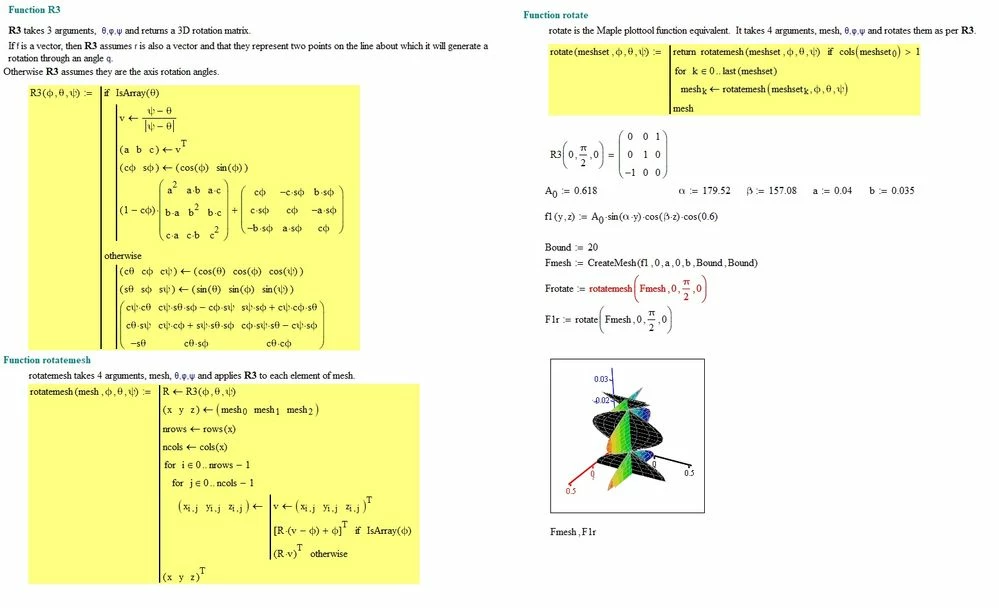
I'm trying to use the "rotate" function obtained from the "plottool" collection downloaded from this community some time ago. I would like to know why the "rotatemesh" function is marked in red as it is evident from the following figure, while the function "rotate" which utilizes it, doesn't give error?:
rotate.jpg

23-Emerald V
Dec 29, 2021 9:04 AM UTC

@-MFra- wrote:

Hello everyone,
I'm trying to use the "rotate" function obtained from the "plottool" collection downloaded from this community some time ago. I would like to know why the "rotatemesh" function is marked in red as it is evident from the following figure, while the function "rotate" which utilizes it, doesn't give error?:


Because rotate operates upon the whole 3D mesh (3x(BoundxBound)) whereas rotatemesh only operates upon an individual mesh (eg, x-y or z-x (BoundxBound)).  Try vectorizing the rotatemesh expression in Frotate.


Stuart 

11 replies

24-Ruby IV
Dec 29, 2021 8:14 AM UTC

 Hi,


Please upload your worksheet.

Translate
23-Emerald V
Dec 29, 2021 9:04 AM UTC

@-MFra- wrote:

Hello everyone,
I'm trying to use the "rotate" function obtained from the "plottool" collection downloaded from this community some time ago. I would like to know why the "rotatemesh" function is marked in red as it is evident from the following figure, while the function "rotate" which utilizes it, doesn't give error?:


Because rotate operates upon the whole 3D mesh (3x(BoundxBound)) whereas rotatemesh only operates upon an individual mesh (eg, x-y or z-x (BoundxBound)).  Try vectorizing the rotatemesh expression in Frotate.


Stuart 

Translate
-MFra-21-Topaz IIAuthor
21-Topaz II
Dec 29, 2021 9:26 AM UTC

Thank you very much!

rotate+.jpg

Translate
23-Emerald V
Dec 29, 2021 10:33 AM UTC

Nessun problema.

Translate