19-Tanzanite
January 21, 2026
Solved

Why variable result is not updated in this scenario?

  • January 21, 2026
  • 1 reply
  • 770 views

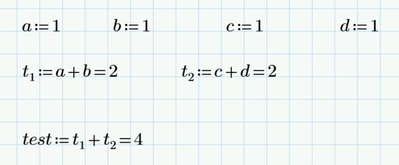
Hi,

Cornel_0-1769003749623.png


Then I overwritten values for t1 and t2 and test variable result was updated with the new values of t1 and t2:
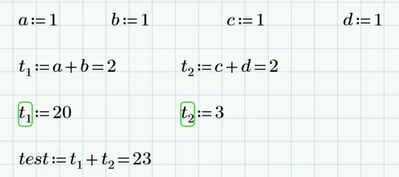
Cornel_1-1769003799198.png


Then I disabled t1 and t2, but the test variable remained unchanged. Why t1 and t2 did not took value 2 and update the test variable result with 4?
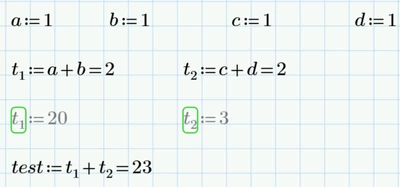
Cornel_2-1769003816061.png


Best answer by o.svahn

Solved in Prime 11.01


Owe

1 reply

25-Diamond I
January 21, 2026

Why t1 and t2 did not took value 2 and update the test variable result with 4?

Because Prime is buggy!


I can confirm that I experience the same faulty behaviour (Prime 11, with auto calculation turned on).

Only after an explicit recalculation of the sheet (Ctrl-F5) the result updates correctly.

For the bug to show up its necessary to disable both variables at the same time!

Werner_E_0-1769005695405.png

As we can see the variables a and b actually are updated correctly, its the assignment of variable test which is not updated.


Feel free to report this bug to official PTC support. Good luck!

Cornel19-TanzaniteAuthor
19-Tanzanite
January 21, 2026

Beside Prime 11, I tested this situation also in Prime 9 and Prime 10.0.1 and the same behavior is happening also in these latter two versions... 

25-Diamond I
January 21, 2026

Yes, it seems to be a rather old bug.

I traced it back to Prime 5.

In Prime 4, the behavior is still OK as it should be.

You can mention this if you decide to report the bug officially.