

1-Visitor
February 12, 2015
Solved
Writing Pseudocode in MATHCAD
- February 12, 2015
- 2 replies
- 2654 views

Hi,
Mathcad gives you the option to write sub-programs as functions, see attachement.
all of the program tools are available in the programming toolbar at the top of the mathcad window, most of them are replicated as short-cut key combinations:
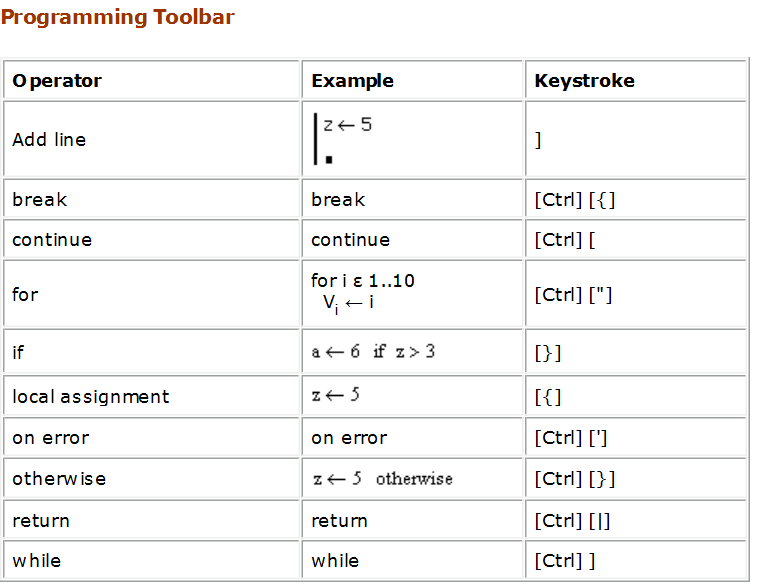
Similar functions are available from the ribbon in MC prime, but (as far as I know) there are no short-cut keys
Otherwise the functionality should be similar (and translateable)
Note that when using the program feature it is the left arrow for assignement not :=
All variables used within the program can use variables already defined (above) in the work sheet unless otherwise redefined in the program or as parameters, but ONLY variables that are returned (as the example) will be accessible to the rest of the work sheet; all other assignement are only valid in the scope of the program fragment.
Hope this helps.
Andy
You could also write a function to compare and swap strings ( as your other post) - a for loop or while loop would allow you to iterate through the array.
Message was edited by: A Westerman
No account yet? Create an account
Enter your E-mail address. We'll send you an e-mail with instructions to reset your password.