13-Aquamarine
August 22, 2023
Solved

X Y Plot Axis

  • August 22, 2023
  • 3 replies
  • 3613 views

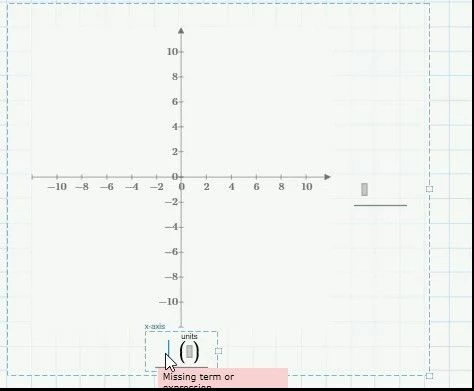
In Mathcad Prime 8.0 the X and Y axis are reversed to what I normally see.  Y is usually up and down.  X is usually left to right.  Is there a way to reverse the Axis definitions? 


Best answer by terryhendicott

Hi,

The axis are not reversed to your normal use.

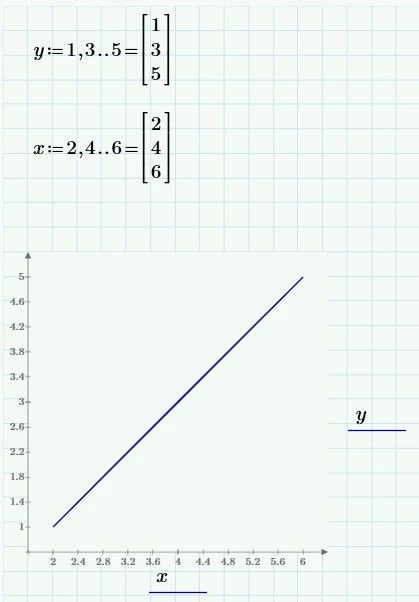
The x axis (one at the bottom) is positive left to right

Capture.JPG

The y axis (on the right side) is positive down to up.

You will get used to this layout.

Here is an example.

Capture3.JPG

Cheers

Terry

3 replies

19-Tanzanite
August 22, 2023

 f1(1,1,1,t) is Y axis, and f2(1,1,1,t) is X axis

Cornel_0-1692722423152.png


Or you can drag f1(1,1,1,t) from right to left of the plot.

Cornel_0-1692722495365.png


Cornel_0-1692722631426.png


In all above cases: f1(1,1,1,t) is Y axis, and f2(1,1,1,t) is X axis


13-Aquamarine
August 22, 2023

I see what you are pointing out.  But in the United States, f1(1,1,1,t) would be on the X axis and f2(1,1,1,t) would be on the Y axis.  The program should identify the left-right as the X-Axis.  But the program identifies this as the Y axis.  Is there a way to reverse the axis definitions inside the program?

19-Tanzanite
August 22, 2023

I do not know if it is a way like you want, but you can still put f1(1,1,1,t) where f2(1,1,1,t) is right now, and then put f2(1,1,1,t) where f1(1,1,1,t) ÃŪs right now. So, to interchanged f1() with f2 on the axis...

21-Topaz II
August 22, 2023

Hi,

The axis are not reversed to your normal use.

The x axis (one at the bottom) is positive left to right

Capture.JPG

The y axis (on the right side) is positive down to up.

You will get used to this layout.

Here is an example.

Capture3.JPG

Cheers

Terry

13-Aquamarine
August 22, 2023

O.K... I guess it is my mistake.  Thanks for the reply!

25-Diamond I
August 22, 2023

As Terry already cleared up it seems that  you misinterpreted the position of the default placeholders for the axis expressions.

Werner_E_0-1692735904964.png
Werner_E_1-1692735914594.png


In Prime you are allowed to drag these expressions using the mouse with held left mouse button to a couple of different positions if you like that better, e.g.

Werner_E_2-1692735988834.png

And while I won't recommend doing so you may also move the axis around which makes a bit clearer that the axis expressions in their default position are connected to the correct axis as you expect - the expression at the bottom center to the horizontal x-axis and the expression to the right to the vertical y-axis


Werner_E_3-1692736196210.png


13-Aquamarine
August 22, 2023

Thank you..  Yes, I misrepresented x and y axis.  My mistake.


Bob