24-Ruby IV
September 28, 2013
Solved

y(x):=Find in Mathcad Prime

  • September 28, 2013
  • 6 replies
  • 2764 views

Sorry, I can not solve this problem in Mathcad Prime.

I see that y(x):=Find not work in Prime. Or?

Mathcad 15 file in attach. You can convert it into Prime 2. I have only Prime 3.
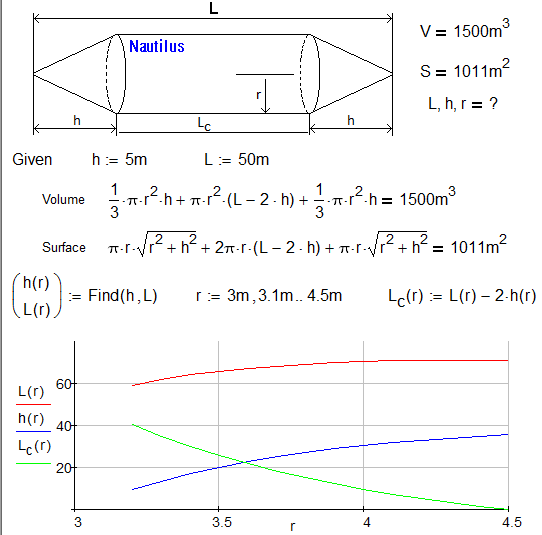
Nautilus-Plot.png

Best answer by ValeryOchkov

Thanks, Alan! Danke, Werner!

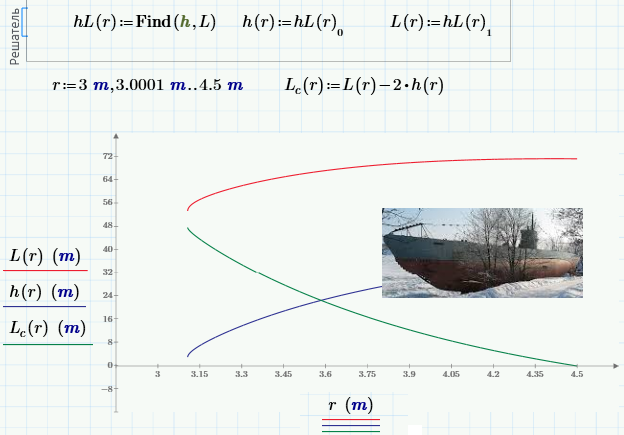
But спасибо to me - I found the solution myself

Nautilus-Prime-Plot.png

Yes - in Mathcad 15 more simpe!

6 replies

19-Tanzanite
September 28, 2013

One way of doing it in Prime2 is attached. Strange that it doesn't allow the same functional form of solution as MC15 though!

Alan

Werner_E
25-Diamond I
September 28, 2013

Strange that it doesn't allow the same functional form of solution as MC15 though!

Agreed - it should work in Prime, too, and we would even need more support for vectors of functions.

You can turn h and L in "real" functions but we must do it one after the other using the vector index, otherwise we run into the same problem again. See screenshot.

If you don't need the functions themselves as its just for plotting, Alan's way is much more efficient. If using functions every single evaluation of Lc has to call the solve block twice (as in Valery's MC15 version).

hlr.png

EDIT: For what its worth here is a more efficient definition for Lc(r)

lcr.png

ValeryOchkov24-Ruby IVAuthorAnswer
24-Ruby IV
September 28, 2013

Thanks, Alan! Danke, Werner!

But спасибо to me - I found the solution myself

Nautilus-Prime-Plot.png

Yes - in Mathcad 15 more simpe!