
1-Visitor
July 12, 2022
Solved

Can't Convert from MathCad14 to MathCad Prime 8.0

  • July 12, 2022
  • 2 replies
  • 2780 views
I have installed the MathCad 8.0 Prime trial version. However, when I navigate to Input/Output tab, the XMCD, MCD tab is under intensified. I cannot convert files from an older version. The license file states it is a fully functional license. How to enable convertions.
Best answer by VladimirN

Hi,


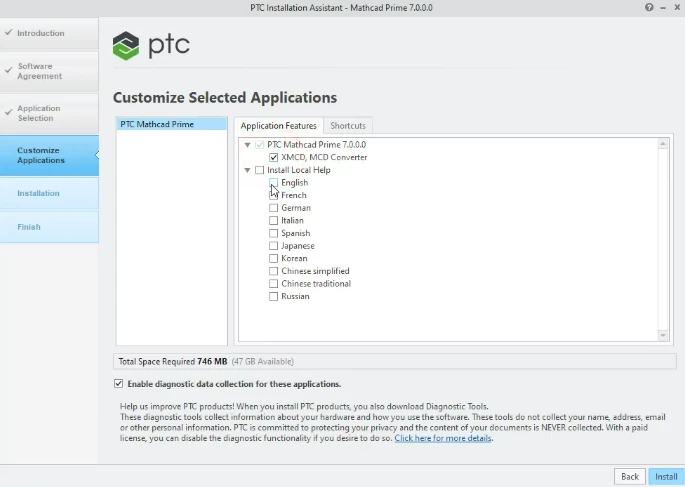
Starting from the 7th version of Mathcad Prime you can use the built-in converter (before the installation process, it is necessary to select it among the installation components).


Pic_1.png

2 replies

23-Emerald III
July 12, 2022

Not a MathCAD user, but I think you can only open MathCAD 15 files directly in Prime.

Maybe you need MathCAD 15 installed before Prime8.

1-Visitor
July 12, 2022
Is it possible to get a copy of MathCad 15 as a free trial? Everything I see on the internet wants to install the latest version of MathCad, (Prime versions)...I cannot assess anything until I am permitted to convert legacy data into the latest version...
DJNewman
18-Opal
July 13, 2022

It hasn't been possible to get a free trial of Mathcad 15 since the end of December 2021 due to the end-of-sale.

PTC Marketer for Creo and Mathcad. I run their YouTube channels, some Creo campaigns, and all Mathcad campaigns and communications.
VladimirN24-Ruby IIIAnswer
24-Ruby III
July 12, 2022

Hi,


Starting from the 7th version of Mathcad Prime you can use the built-in converter (before the installation process, it is necessary to select it among the installation components).


Pic_1.png

1-Visitor
July 13, 2022

Thanks!  That fixed it for me......

24-Ruby III
July 14, 2022

You're welcome.