1-Visitor
March 14, 2023
Solved

Mathcad Express Prime 9.0.0.0 - Can't open old Mathcad files

  • March 14, 2023
  • 1 reply
  • 3123 views
I'm trying to open old Mathcad files that have the extension formats xmcdz, xmcd, and mcd. However your current version of Mathcad Express Prime 9.0.0.0 doesn't seem to be able to open these old formats. What do I need to do to be able to open and convert these old files into the new version.

Your assistance is much appreciated.
Best answer by VladimirN

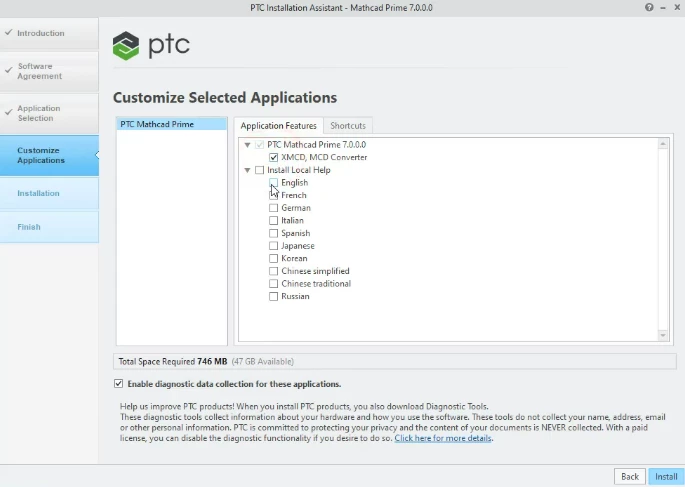
Starting from the 7th version of Mathcad Prime you can use the built-in converter (before the installation process, it is necessary to select it among the installation components).


Pic_1.png

1 reply

VladimirN24-Ruby IIIAnswer
24-Ruby III
March 14, 2023

Starting from the 7th version of Mathcad Prime you can use the built-in converter (before the installation process, it is necessary to select it among the installation components).


Pic_1.png

David_S1-VisitorAuthor
1-Visitor
March 14, 2023

Hi Vladimir,


Thanks for your assistance.  I'm actually trying to install the free monthly trial of Mathcad Express Prime as I have not used the program for sometime.  I am starting a new engineering role where I need to use the Mathcad program again and be able to open up and use some previous created files.                      Anyhow I tried to uninstall and then reinstall Mathcad Express Prime, but I can only install Mathcad Prime 9.0.0.0.  It will not allow me to install the 7th version of Mathcad Prime.  I believe you are saying only the 7th version has the built-in converter that can open the old extension file formats.   Is there any way of downloading the 7th version of Mathcad Prime from the PTC website?  

24-Ruby III
March 14, 2023

 Hi David,


The built-in converter is available from the 7th version, that is, for the 7th, 8th, 9th. So it is also available for selection when installing the 9th version of Mathcad Prime.